
- Details
- Written by: Acacos
- Category: blog
- Hits: 206
If there is something every business owner should do and could dramatically profit from it, then it would be A/B Testing or Multi-Variate Testing the required step for Conversion Optimization.
Conversion Optimization was pioneered by Amazon and also applied by Dan Siroker in the famous 2008 Obama presidential fundraising campaign. And ever since the books of marketing changed for good.
You decide to design your website and need to put a call to action button. What color should you use Red or Yellow button? How about Green or Purple?
No one knows, not even the artist or the designer.
Conversation Rate optimization works as follows: Say on a given Week you have 1000 visitors to your website. You split the traffic 50/50 Group A 500 visitors and Group B 500 visitors. You do not change anything in the web page content other than button colors.
You show Group A the Red button and count how many out of the 500 visitors clicked on the Red button
You show Group B the Yellow button and count how many out of the 500 visitors clicked on the Yellow button.
Say that from Group A, 83 visitors out of 500 clicked the Red button, and from Group B, 119 visitors out of 500 clicked on the Yellow button.
The conversion rate for the Red Button is calculated from Group A is 83/500 = 17%.
The conversion rate for the Yellow Button is calculated from Group B is 119/500 = 14%.
remaining 500 the yellow button
How did Obama raise so much money and win the 2008 election?
The event was one most spectacular use of statistics for marketing - it changed the fundamentals of business optimization.
The 2008 Obama Presidential Campaign has become a famous example of how conversion rate optimization can help businesses, organizations, and even political candidates accomplish their goals.
From a product mix point of view, the campaign had
During the campaign, Dan Siroker, the founder and CEO of Optimizely, was serving as the Director of Analytics for the Obama Campaign. He proposed that different headline and image/video combinations should be tested to see which one was the most effective at getting people to sign up for the President’s e-mail newsletter.
The campaign team knew that a large percentage of people who sign up would end up supporting the President financially, but the trick was getting the most people possible to sign up for the campaign newsletter.
Dan’s team ended up putting together 24 different variations with four button options, three images, and three videos. Interestingly, most people on the team assumed the videos would be the most effective at getting people to sign up.
Image of President Obama's campaign slogan from 2008, "change we can believe in".
This is a screenshot of the winning variation from Barack Obama’s 2008 successful presidential campaign.
So what was the result? After testing with 310,382 visitors with each variation seen by around 13,000 people, the version with a picture of Barack Obama’s family and a “Learn More” call-to-action button led to a conversion rate of 11.6% for the winning variation, a 40.6% increase over the original conversion rate which as 8.26%.
Even more impressive than the increase in conversions from the winning variation is the fact that the new version let to approximately 2,880,000 additional sign ups, 288,000 more volunteers, and an additional $60 million in donations over the course of the campaign.
- Details
- Written by: Acacos
- Category: blog
- Hits: 379
You should try this first. Open a browser and search for the term "banana", the search engine will show you a banana.
With the same browser now search for the term "apple". Surprise, no fruit, the first result on google will show you Apple Inc, apple.com, or iphones.
Strange! Right? - that is SEO.

What is SEO and why does it matter?
In short, SEO is an acronym for Search Engine Optimization. In reality, SEO is how to configure your website to influence search engines to show your website for the desired query.
Wouldn't it be awesome if your website appears first on google when some query the keyword "apple"? Well, not that easy!
Your website is NOT just a business card, it is your money-making machine.
Commonly known in business: Location, Location, Location. A website is SEO, CRO, and strategy. A source of traffic, a storefront with customer interaction communication and sales transactions.
Google has an approximately 92% market share of searches, with about 100,000 searches every second. Meaning if a website is not indexed by Google it will not be visible, i.e. zero traffic.
You as a small business owner must be looking to generate more leads and sales. Digital Marketing is becoming very competitive and costly. As such business owners need to adapt and learn the basics.
Must-have SEO for Local / Small Business
Marketing is subject to business decisions and is constrained by owners' goals and budgets.
For zero budget, the free resources and the bare minimum are listed.
- A fairly well-designed website - must be mobile responsive, and loads fast.
- Google Business (ending soon will be replaced by Google Maps)
- Google Maps (free listing)
- Bing Places (free listing)
- Apple Map (free Listing)
- Google Analytics (free account and reports GA3 will be replaced by GA 4 soon)
- Google Search Console (free account and reports)
- Bing Webmaster (free account and reports)
- Yelp (claim your free business and never pay for the paid version)
- Facebook Page (free account and reports)
- Twitter (free account)
- Business Directory Listing (i.e. Yellow Page, White Pages, Angie List)
We see many local business owners and contractors managing their digital marketing which is wonderful and highly suggested. We recommend that owners get involved with the big picture and help generate content as they know their business better than anyone else. Owners, however, should not necessarily manage the details or website development - preferably leave that for the experts.
Understand this First
Zero conflict of interest benefits you.
The reports from Google Analytics and Google Search Console are owned and operated by Google LLC and thus independent of your SEO expert. That is the reason why you want to create GA and GSC accounts and then provide access to your digital marketing agency - you are in control.
Trust but verify.
Google Analytics Reports for SEO
The 3 basic must-have reports from Google Analytics. There is more but I am willing to settle for 3 now.
Audience / Overview Report
This report shows total traffic and shows many valuable metrics including:
- Total Trafic Curve
- Returning Visitors vs New Visitors
- Country (critical for Local Customers)
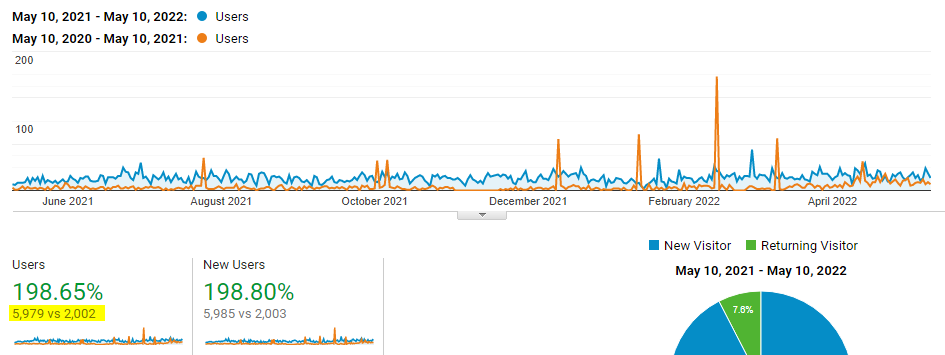
As you can see the report is showing a year-over-year increase of 4000 unique visitors. Going from 2003 to 5985 that is a 200% growth rate.
We have witnessed some new visitor growth rates in the range of 500% to 1700%. Some even claim to have achieved 7 and 8 folds increase.
Marketing Channels Report
This report shows all marketing channels including:
- Organic, Paid Search, Direct, Referrals, Email Campaigns, Social Media, Direct, etc...
- User / Engagement / Pages Visited
- Goal Conversion Rate / Goal Completion
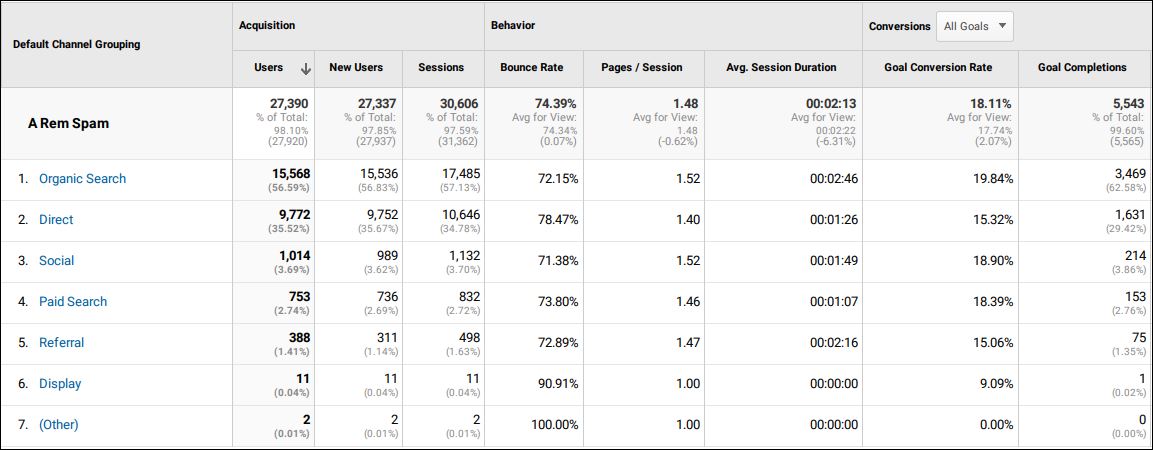
From this report, we usually calculate campaign performance. It helps us in many ways, most importantly we use it as a diagnostic tool to discover issues and identify problems, and to a less extent, we use it to measure ROI.
Goal Conversion Report
This report shows Goals Conversion Rate and quickly shows low using a virtual page concept:
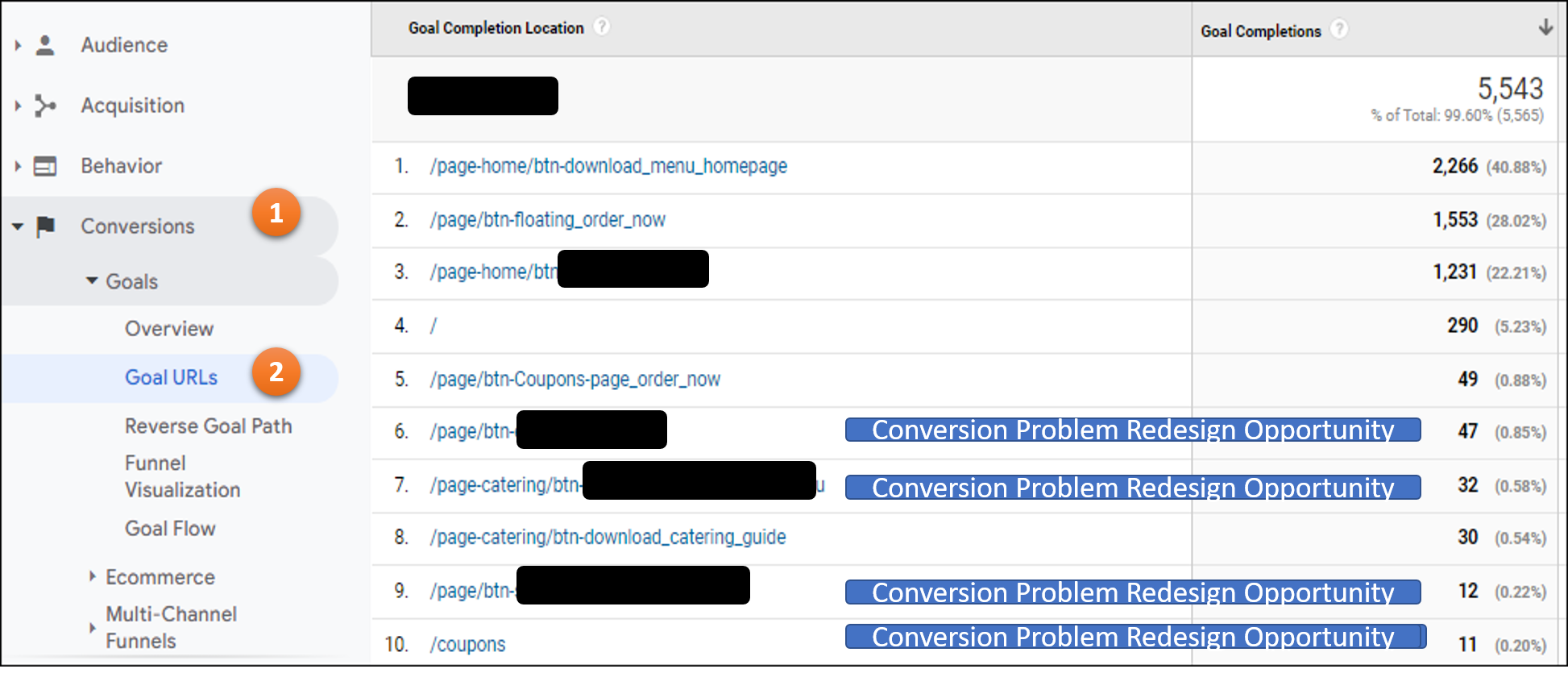
We claimed that a website should be treated as a money-making machine. So if there is enough traffic and there is no conversion (clicks) it means something is wrong. i.e. we are not providing what the customer came in to find.
We treat problems like the ones shown in the report as an opportunity for improvement.
Google Search Console Reports for SEO
Again 3 most basic reports, but there is much more!
Main Google Search Consol Graph
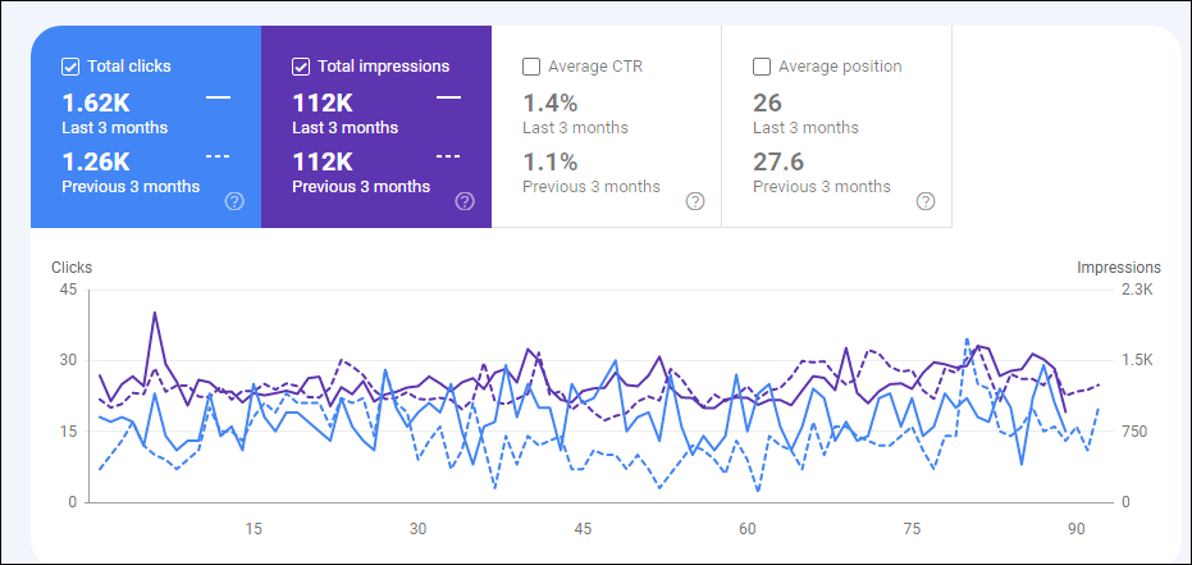
The graph shows, the clicks, the impressions, Click Thru Rate, and position.
The Graph could be used to compare progress. As shown in the report there is an increase in the overall click for that website. We have seen in real-life impression improvement of 1000% over a period of just a few months. We said impression and clicks because if there are no impressions (visibility) there will be no clicks.
Pages Report on Google Search Console
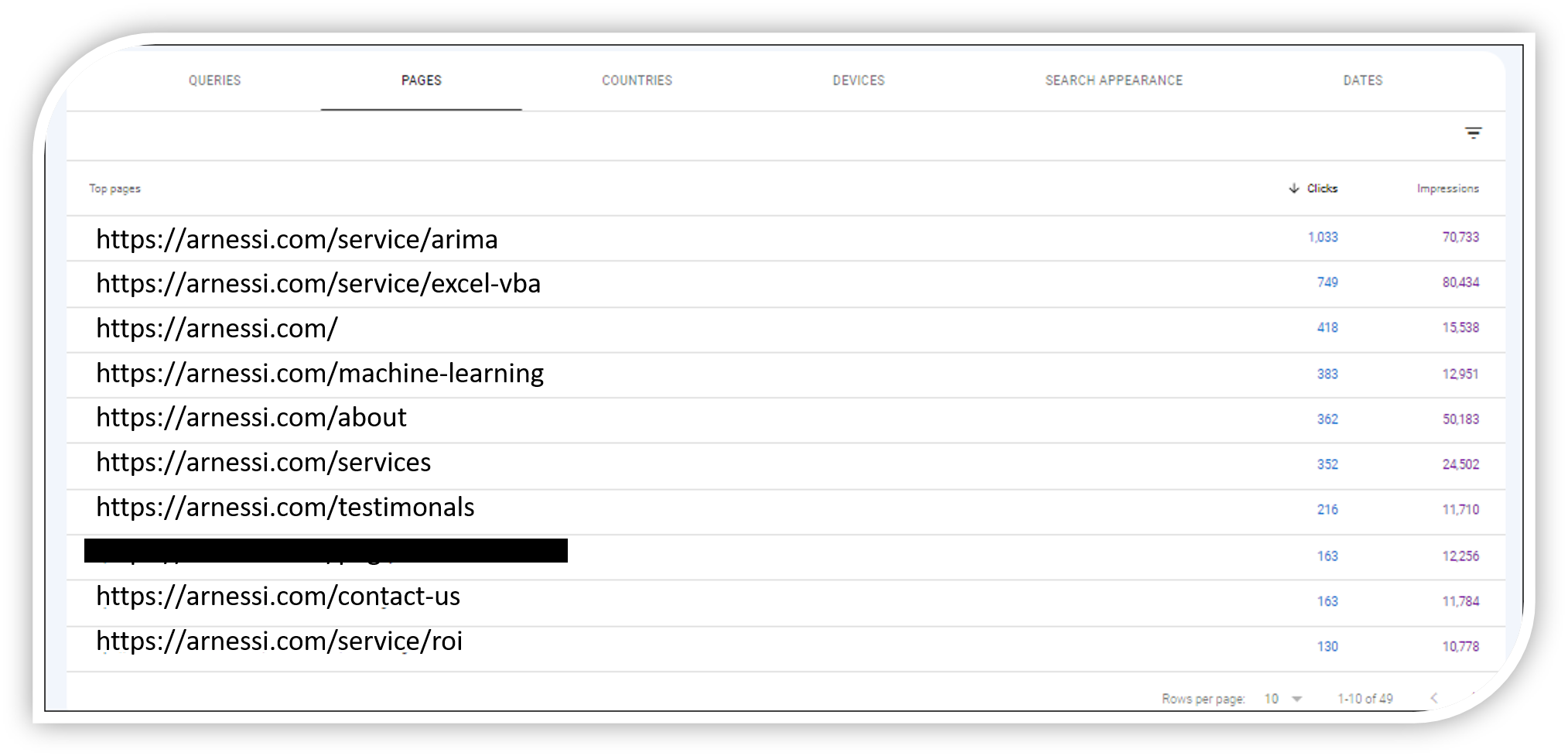
Information-based decisions, problem finding then problem-solving. The GSC is our map to categorize low performing webpages on a given website.
Although the numbers, (impressions, and clicks), are real in the report picture below, we overlayed and modified the URL to respect the privacy of the client.
Few takeaways from the report
- The main page is NOT the most dominant page, the pages arima and excel-vba have more impressions and more clicks. Wonder why? Professional SEO for small businesses is the answer.
- The number of clicks and impressions have a high correlation. In theory, the higher the impression the higher the clicks. But that is not always true.
- The most dominant page arima has 70,000 impressions while the page roi has only 10,000 impressions even though they are "identical pages" - notice the quote and quote. So do not be surprised if you see that arima has 10 more clicks compared to roi page. So what's wrong?
- It is clear that ROI is the least performing page, so we consider it to be a low-hanging fruit aka opportunity.
- This website has 41 pages and each page is ranked for about 1000 keywords or more. That's why the website ranks for 112,000 keywords. Some experts could rank a website for millions of keywords and bring valuable traffic.
- Do you know how many web pages and how many keywords google ranked your website for?
Keywords Report Google Search Console
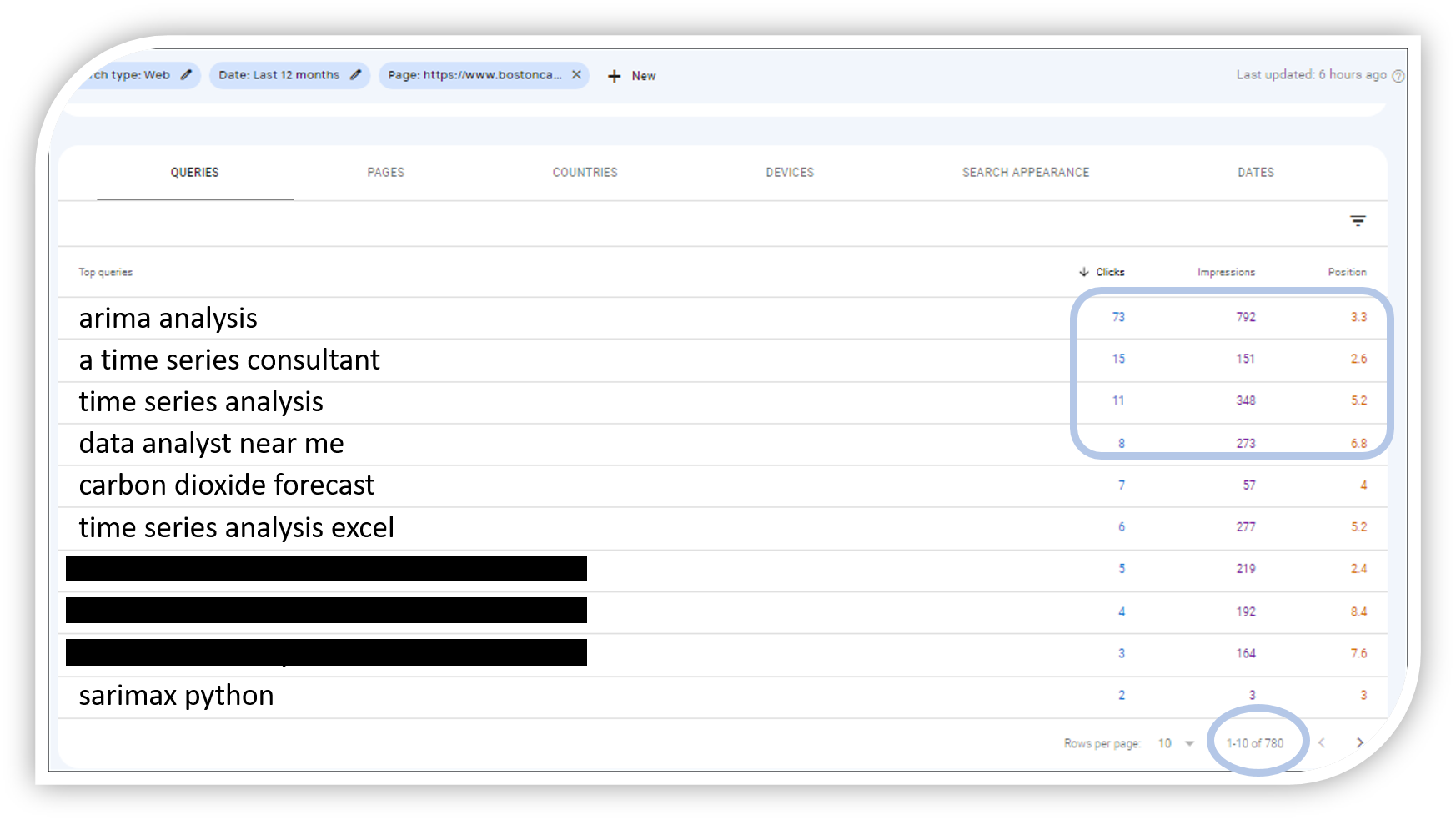
You searched for "apple" and google showed an iPhone. This report speaks volumes and will tell business owners what each and every page in their website ranks for and what it does not rank for. It also shows the position. Crazy enough we discover keywords that we ranked for without aiming for those keywords.
From the page report, we selected the page URL arima. The first to notice in the keyword report is that the page ranks for 780 search phrases. The keyword report shows all variations of the keyword 'arima', 'time series analysis', 'data science', sarimax, etc.
Small business owners could slice and dice these kinds of reports and find the keyword that makes the most sense to their business objectives. Given the high ROI of SEO, it is very competitive. As such it might be a challenge for business owners to rank for the exact keywords they wish for. But at least with these reports, they are much better informed about what is available. One thing is for sure, there are many untapped niche opportunities that our team discovered while performing these and similar analyses.
Final Thoughts
You should by now have the bare-minimum tools to run SEO for local business or SEO for small business. Even with zero budget, you have a list of proven freebies.
Words of caution, many freebies won't last for too long. Take advantage of those free items now! There were many more "free" SEO tools in the past, but those tools are either no longer available or are subject to costly monthly subscriptions.
You should also have developed the knowledge to be able to negotiate a good SEO proposal, we do not recommend you negotiate on price but rather focus on measurable performance.
Focus on providing good products and services, no matter how good the SEO plan you have in place. Your business will grow more and faster with good Customer Life Value (CLV).
Keep in mind, that digital marketing is dynamic and is subject to many updates. So feel free to re-visit this page as we will edit it with more up-to-date information. Stay Tuned.
- Details
- Written by: Acacos
- Category: blog
- Hits: 432
A time series is a sequential record of observations gathered at regular intervals. In the realm of data analysis, time series serves as a potent tool, offering insights into past trends and future projections.
Unlocking the Power of Time Series Analysis
You could either record time series and passively use data for reporting purposes. Or you could analyze time series to make valuable and powerful predictions. Akin to peering into a crystal ball, empowers us to make informed predictions based on historical data.

Key Considerations for Time Series Modeling
When delving into time series modeling, the quality of the model significantly impacts its efficacy. However, more crucial than the model itself is a deep understanding of the problem at hand and its underlying purpose.
It is fundamental to know that when dealing with time series, the future depends on the past. (i.e. Y(t+1) is a function of Y(t).)
Real-Life Applications of Time Series Analysis
Time series data varies in frequency, ranging from seconds to years, and finds applications in diverse domains:
- Seconds: signals processing, web streaming
- Minutes: customer service calls, gas demand
- Hourly: weather forecasting
- Daily: pandemic pathogens propagation
- Weekly: sales
- Monthly: inventory control
- Quarterly: tax payments
- Yearly: climate change, budgeting
Handling Time Series the wrong way?
While Excel trend lines are commonly used for time series analysis, they often lack robustness and accuracy. Opting for advanced algorithms and seeking assistance from time series professionals is advisable for critical modeling tasks.
Advanced Time Series Handling - Overcoming Challenges
Challenges in time series analysis include stationarity, trends, seasonality, and understanding endogenous versus exogenous variables.
Endogenous variables are the opposite of exogenous variables. Endogenous variables are influenced by other variables in the system (including themselves). Exogenous variables can have an impact on endogenous factors. Exogenous variables are not influenced by other variables in the system and on which the output variable depends. For simplicity, we will consider only endogenous variables.
Stationarity, in particular, requires careful consideration and can be assessed using various techniques such as the Augmented Dickey-Fuller test.
Practical Steps for Time Series handling:
Inspecting the data, identifying trends and seasonality, checking for missing or outlier values, and ensuring stationarity are crucial preliminary steps. Subsequently, selecting an appropriate model and evaluating its performance using criteria like AIC, BIC, and MSE is essential.
- Inspect the data
- Check for trends (graph all the data)
- Check for seasonality (graph a small subset of the data i.e. one year of monthly series)
- Check for missing values
- Check for zero values
- Check for outliers
- Check for Stationarity
- Augmented Dickey-Fuller
- Segmented Random Mean constant stability verification
- Segmented Random Variation constant stability verification
- Check for Seasonality
- Select the model
- Simple Trend Line
- AR model
- MA model
- ARMA model
- ARIMA model
- SARIMA model
- SARIMAX model
- Select performance criteria
- AIC
- BIC
- MSE
- Plot the predicted / forecast vs actual
Exploring a Real-World time series Dataset
To illustrate time series analysis concepts, we'll utilize the CO2 Carbon Dioxide Time-Series dataset. This dataset spans from 1965 to 2004, comprising 480 monthly observations. It exhibits seasonality, trends, and stationarity, making it an ideal candidate for modeling exercises.
This level of complexity requires a great deal of manipulation and full usage of the ARIMA model. A good exercise and a happy medium between beginner and advanced forecasting analysis. We recommend inspecting the data before usage.
To download the data, click here, You could find the official and updated Time Series for carbon dioxide at the NOOA website. https://gml.noaa.gov/ccgg/trends/mlo.html
Time series analysis is a powerful tool for extracting valuable insights and making informed predictions from sequential data. By following best practices and leveraging appropriate techniques, analysts can unlock the full potential of time series data in various domains.
Step 1 Time Series Inspection
Inspecting time series data is the first step towards unlocking its insights. By visualizing the data, time series analysts gain valuable insights into trends, seasonality, and potential patterns. In our analysis, we'll use Python for data visualization and analysis.
Code Fragment for Data Plotting the time series:
import pandas as pd
# when naming files i usually use ts for time series and frequency i.e. monthly
df = pd.read_csv('ts_co_monthly.csv')

co = df['co'].values

# Plot Data
from matplotlib import pyplot as plt
plt.plot(co, color='green', label='TS Actual')
plt.title("carbon dioxide Time Series Analysis", color='red', loc='left')
plt.xlabel("dummy index")
plt.ylabel("carbon dioxide")
plt.legend()
plt.show()
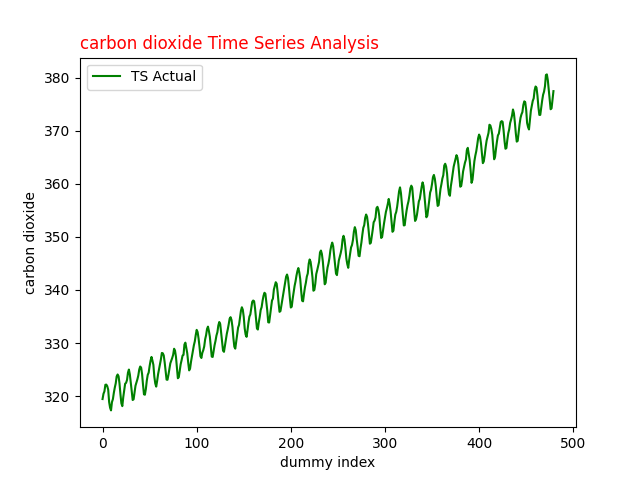
Fig.1 Carbon dioxide Time Series for analysis with ARIMA
Interpreting the Time Series Plot:
The plotted at Fig.1 time series data reveals insights into carbon dioxide levels over time. Notably, the graph exhibits an upward trend saw tooth with seasonal fluctuations, indicating both long-term trends and short-term variability.
Zooming in for Seasonal Analysis:
To better understand the seasonal effect, we'll zoom in on a subset of the data, focusing on a 36-month period.
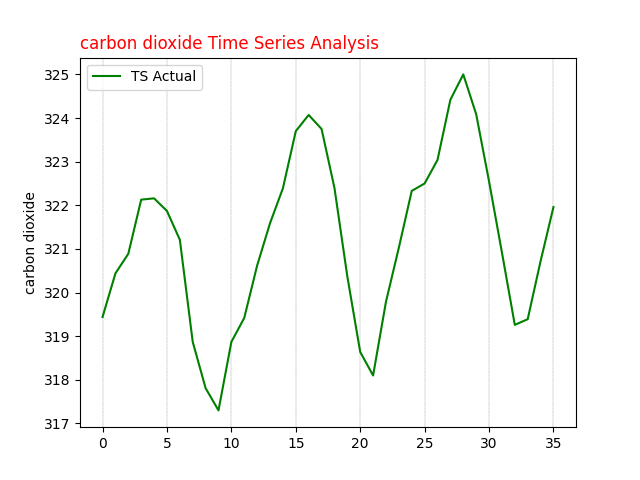
Fig. 2 carbon dioxide time series analysis 36 months seasonal plot
Step 2 Stationarity Analysis for Time Series
Ensuring the stationarity of time series data is pivotal for accurate modeling. When applying ARIMA to analyze a time series, we assume that the observations being modeled are stationary. One common method to verify stationarity is by assessing the constancy of mean and variance across the dataset.
We employ the Augmented Dickey-Fuller test, a widely accepted method in time series analysis, to determine stationarity. Once understood, this testing method is efficient and could be programmatically automated. Let's delve into the results of this test:
import pandas as pd

df = pd.read_csv('ts_co_monthly.csv')

# Note the data is monthly
co = df['co'].values

from statsmodels.tsa.stattools import adfuller
def ADF_Function(timeseries):
    adfTest = adfuller(timeseries)
    if adfTest[1] < 0.05:
        print('Stationary p-value: %.5f' % adfTest[1])
    else:
        print('Not Stationary p-value: %.5f' % adfTest[1])
    print('# of lags: %.0f' % adfTest[2])
    print('# of Observations: %.0f' % adfTest[3])
    print('ADF Statistic: %.3f' % adfTest[0])
    print('Critial Values:')
    for key, value in adfTest[4].items():
        print('\t%s: %.3f' % (key, value))

# ADF Test Original Data
ADF_Function(df['co'].values)

# ADF Test 1st Order
ADF_Function(df['co'].diff().dropna())
Results of ADF Test:
For the original dataset, the p-value exceeds 0.05, and the ADF statistic is 1.911, indicating non-stationarity. However, after 1st differencing, the ADF statistic becomes -4.498, lower than the 5% critical value, with a corresponding p-value below 0.05, confirming stationarity.
Hint: The original dataset comprises 466 observations, while after differencing, it reduces to 465 observations. As a final check, a plot Fig. 3 of the 1st differencing illustrates oscillations around zero without discernible trends.
# Results of ADF Test on the original series
Not Stationary p-value: 0.99855
# of lags: 13
# of Observations: 466
ADF Statistic: 1.911
Critial Values:
	1%: -3.444
	5%: -2.868
	10%: -2.570

# Results of ADF Test after 1st Differencing
Stationary p-value: 0.00020
# of lags: 13
# of Observations: 465
ADF Statistic: -4.498
Critial Values:
	1%: -3.444
	5%: -2.868
	10%: -2.570
In order to determine the model, a quick visual inspection of the data series is required. Next, we will generate a quick Python code and some plots to better understand the data. The plots will include 1st order differencing and 2nd order differencing and the associated autocorrelation plots known as ACF and PACF plots.
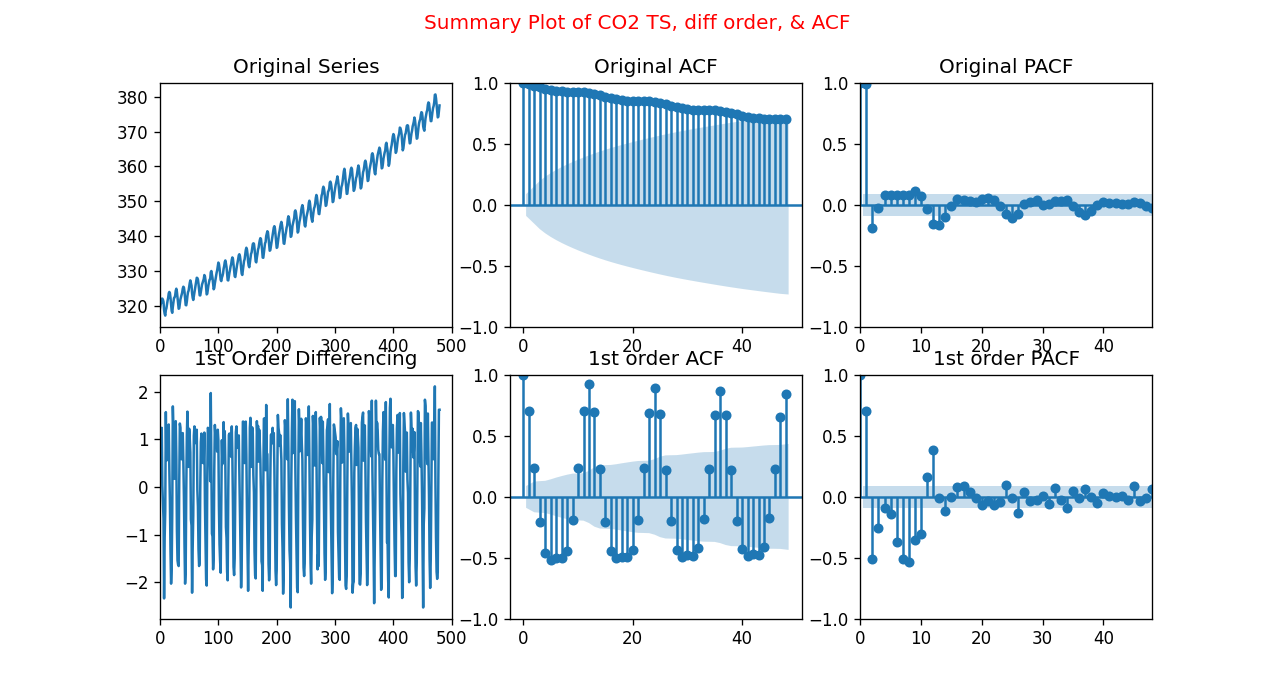
Fig.3 Summary of Carbon Dioxide Time-Series Differencing, ACF, and PACF plots
Visualizing Stationarity and Autocorrelation:
To gain further insights, we visualize the stationarity and autocorrelation of the time series data:
import pandas as pd

df = pd.read_csv('ts_co_monthly.csv')

# Note the data is monthly
co = df['co'].values

from matplotlib import pyplot as plt
from statsmodels.graphics.tsaplots import plot_acf, plot_pacf

DIFFACF = 'Yes'
if DIFFACF == 'Yes':
    cstmz = {'figure.figsize': (9, 7),
             'figure.dpi': (120),
             }
    plt.rcParams.update(cstmz)
    fig, axes = plt.subplots(2, 3, sharex=False)
    fig.suptitle('Summary Plot of CO2 TS, diff order, & ACF \n', color='red')

    axes[0, 0].plot(df['co'].values)
    axes[0, 0].set_title('Original Series')
    axes[0, 0].set(xlim=(0, 500))
    plot_acf(df['co'].values, lags=48, ax=axes[0, 1])
    axes[0, 1].set_title('Original ACF')
    plot_pacf(df['co'].values, lags=48, ax=axes[0, 2], method="ywm")
    axes[0, 2].set_title('Original PACF')
    axes[0, 2].set(xlim=(0, 48))

    # 1st Differencing
    axes[1, 0].plot(df['co'].diff())
    axes[1, 0].set_title('1st Order Differencing')
    axes[1, 0].set(xlim=(0, 500))
    plot_acf(df['co'].diff().dropna(), lags=48, ax=axes[1, 1])
    axes[1, 1].set_title('1st order ACF')
    plot_pacf(df['co'].diff().dropna(), lags=48, ax=axes[1, 2], method="ywm")
    axes[1, 2].set_title('1st order PACF')
    axes[1, 2].set(xlim=(0, 48))

    plt.show()
These plots provide valuable insights into the structure and autocorrelation of the time series data, aiding in the selection of appropriate ARIMA parameters.
What is ARIMA?
Understanding ARIMA, it is an acronym for AutoRegressive, Integrated, and Moving Average. It is fundamental for time series analysis and It comprises three components:
- AR: Autoregression. A model that uses the dependent relationship between a current observation and some number of previous (lagged) observations. Age regression occurs when someone reverts to a younger state of mind.
- I: Integrated. The step of differencing the raw observations (e.g. subtracting an observation from previous observations). Represents differencing, the process of making the time series stationary
- MA: Moving Average. As the name implies, it is the average of a subset propagating along with the data series applied to the residual. A model that uses the dependency between an observation and an error from a moving average.
The ARIMA function is used as ARIMA(p,d,q). The argument also called parameter inside the function takes integer values.
- p: Called the lag order or lag, the number of lags included in the model.
- d: Called differencing degree. The number of times that the raw observations are differenced.
- q: Called the order of moving average. The number of data points being averaged in each step.
Step 3 ARIMA time series selection criteria
To select an appropriate ARIMA model, several steps are involved. First, the data must be made stationary, in our case, after 1st difference the dataset is stationary. Then, the order of the Moving Average (MA) and Auto-Regressive (AR) components is determined from the Autocorrelation Function (ACF) and Partial Autocorrelation Function (PACF) plots.
Fig. 3 illustrates the ACF and PACF plots, aiding in determining the applicability of the ARIMA model. Notably, a decaying ACF plot suggests an MA model, while significant lags exceeding the shaded limit in the PACF plot indicate an AR model.
Once the potential parameters are identified, a series of ARIMA models are tested, varying parameters (p and q) to find the best fit and least error. However, selecting the optimal model can be challenging due to the combination of art and science involved in interpreting ACF and PACF plots.
Looking at the 1st order differencing PACF plot, the first significant lags occur at 1, 8, or 12. This indicates that our model could be AR(1), AR(8), or AR(12).
Similarly, by inspecting the 1st order differencing ACF plot, the first significant lags occur at 2, 8, or 50. This indicates that the model could be MA(2), MA(8), or MA(50) as shown in Fig. 4.
For all practical purposes, MA(50) is unheard about.
When dealing with Time Series ARIMA simpler is usually better, when in doubt take the smaller order.
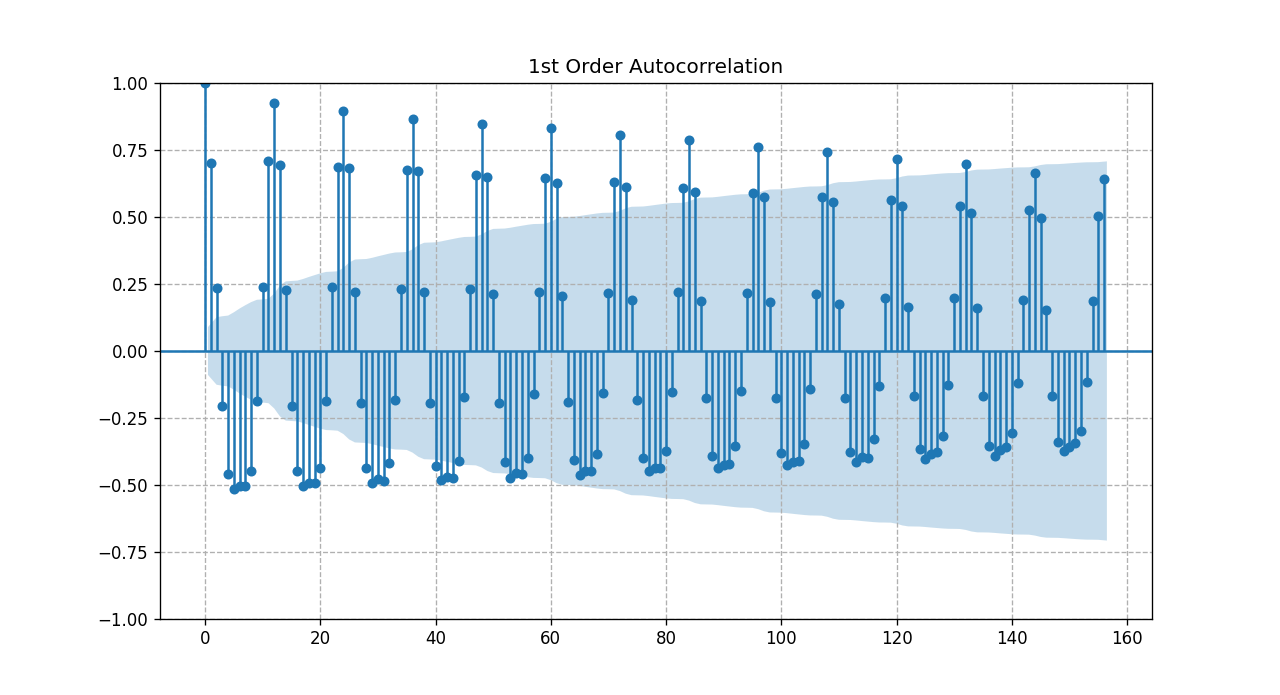
Fig. 4 zoomed time series ACF after 1st_order differencing
Based on the previous discussions we will consider a combination of ARIMA models. We will vary the parameters p & q where P= (1,8, or 12), and q = (2 or 8)
So we will test
ARIMA (1,1,2), ARIMA (1,1,8), ARIMA (8,1,2), ARIMA (8,1,8), ARIMA (12,1,2), ARIMA (12,1,8)
Obviously, the model selection criteria will be based on the model that yields the best fit and least error. Later we will explain where it gets challenging and the importance of doing the right thing
Although ARIMA analysis is scientific, it sometimes involves following protocols and accepting a given result. However, exceptions exist, particularly when dealing with seasonality.
For instance, in cases of monthly seasonality, a manual test with specific parameters is necessary. The provided code demonstrates the manual testing process for ARIMA model parameters, aiding in effective time series analysis.
Initially, we run a loop through several values of p,d,q and selected the trio that provided the least AIC value, the algorithm seemed to converge much faster before looping through p=12, and q=8. The chosen parameters p,d,q were (2,1,1) and the AIC value was 778.67. Numerically that made sense as the simpler model is always preferred for production.
Upon plotting the graph, the model did not seem to provide robust output. The reason behind that is the fact of seasonality. At which point SARIMAX is usually a better performing algorithm to manage seasonality. This article is about ARIMA so we will add another publication to address SARIMAX.
Since we know the model has monthly seasonality we manually test the model for the parameters p,d,q = (12,2,8) as shown in the following code.
import pandas as pd
from datetime import datetime
import matplotlib.pyplot as plt

def parser(s):
    return datetime.strptime(s, '%Y-%m')

ts = pd.read_csv('ts_co_monthly.csv', header=0, index_col=0,
                 parse_dates=True, date_parser=parser)

ts.index = ts.index.to_period('M')

# Note the data is monthly
co2 = ts[:]
train, test = ts[:386], ts[386:480]

ordr = (12, 2, 8)
# now lets build the ARIMA Model
from statsmodels.tsa.arima.model import ARIMA
ts1 = ARIMA(train, order=ordr)
ts_model = ts1.fit()
print(ts_model.summary())

pred_start, pred_end ='1997-01', '2004-12'

pred = ts_model.get_prediction(start=pred_start, end=pred_end,  dynamic=False)
pred_conf_intv = pred.conf_int()

frct = ts_model.get_forecast(steps=204)
frct_conf_intv = frct.conf_int()

lower_frct = frct_conf_intv.iloc[:, 0]
upper_frct = frct_conf_intv.iloc[:, 1]

p,d,q = ordr
plttl = 'CO2 TS Analysis ARIMA ('+ str(p)+ ','+ str(d)+ ','+ str(q)+ ')'

co2['co'].plot(label='Actual', alpha=.6)
pred.predicted_mean.plot(label='Predict')
frct.predicted_mean.plot(label='Forecast')

plt.fill_between(frct_conf_intv.index, lower_frct,
                upper_frct, color='k', alpha=.2)
plt.title(plttl)

plt.ylabel('CO2 parts per million (ppm)')
plt.xlabel('Date')
plt.legend()
plt.show()
Note The statsmodel prediction package offers four distinct prediction functions, interchangeable based on requirements.
Prediction vs Forecasting
In time series analysis, distinguishing between prediction and forecasting is crucial for accuracy and clarity in code implementation.
Prediction vs. Forecasting Methods:
We employ distinct methods for in-sample prediction and out-of-sample forecasting to maintain code organization and readability.
-
Prediction: Utilizing methods like
predictandget_prediction, we make in-sample predictions. These methods are particularly useful for assessing model robustness. -
Forecasting: For out-of-sample estimates, methods such as
forecastandget_forecastare employed. These methods generate forecasts based on the trained model and provide confidence intervals, enhancing the reliability of predictions.
These keeps our code clean and much easier to read.
Model Evaluation:
Examining the report summary of our model reveals key metrics and statistics essential for evaluation.
When done correctly both methods provide confidence intervals shown as the filled shaded area in the graph
-
The AIC (Akaike Information Criterion) value serves as an indicator of model fit. In our case, the initial AIC value is 261.899.
-
By experimenting with different parameter values, particularly adjusting q, we achieved a lower AIC value of 229.51, indicating improved model fit. However, further details on this experimentation are left for deeper exploration.
-
It's important to note that AIC values are specific to our dataset and influenced by factors like training dataset size. In our case, we considered 386 observations out of 4
Model Coefficients and Significance:
The coefficients for Autoregressive (AR) and Moving Average (MA) components provide insights into the model's structure. These coefficients can be utilized for manual calculations and analysis.
-
Examining the coefficients reveals approximately 20 parameters, emphasizing the need for a simpler model.
-
Note that while some p-values such as ma.L2 may exceed the desired confidence level of 0.05, the 95% desired confidence level, for simplicity's sake, we don't delve into discussing these exceptions in this article.
     SARIMAX Results
==============================================================================
Dep. Variable:                     co   No. Observations:                  386
Model:                ARIMA(12, 2, 8)   Log Likelihood                -109.949
Date:                Wed, 15 May 2019   AIC                            261.899
Time:                        12:41:57   BIC                            344.862
Sample:                    01-31-1965   HQIC                           294.806
                         - 02-28-1997
Covariance Type:                  opg
==============================================================================
                 coef    std err          z      P>|z|      [0.025      0.975]
------------------------------------------------------------------------------
ar.L1         -0.3528      0.169     -2.084      0.037      -0.685      -0.021
ar.L2         -0.3105      0.161     -1.925      0.054      -0.627       0.006
ar.L3         -0.5920      0.139     -4.259      0.000      -0.865      -0.320
ar.L4         -0.3147      0.163     -1.926      0.054      -0.635       0.006
ar.L5         -0.5578      0.140     -3.988      0.000      -0.832      -0.284
ar.L6         -0.3135      0.147     -2.137      0.033      -0.601      -0.026
ar.L7         -0.4624      0.163     -2.840      0.005      -0.782      -0.143
ar.L8         -0.5126      0.113     -4.549      0.000      -0.734      -0.292
ar.L9         -0.3463      0.154     -2.245      0.025      -0.649      -0.044
ar.L10        -0.5103      0.136     -3.762      0.000      -0.776      -0.244
ar.L11        -0.2332      0.147     -1.590      0.112      -0.521       0.054
ar.L12         0.3058      0.115      2.658      0.008       0.080       0.531
ma.L1         -0.8645      0.174     -4.957      0.000      -1.206      -0.523
ma.L2         -0.0934      0.160     -0.583      0.560      -0.408       0.221
ma.L3          0.2017      0.173      1.166      0.243      -0.137       0.541
ma.L4         -0.2108      0.165     -1.276      0.202      -0.535       0.113
ma.L5          0.3271      0.154      2.129      0.033       0.026       0.628
ma.L6         -0.2169      0.137     -1.582      0.114      -0.486       0.052
ma.L7          0.2023      0.127      1.590      0.112      -0.047       0.452
ma.L8         -0.2853      0.099     -2.868      0.004      -0.480      -0.090
sigma2         0.0990      0.009     10.887      0.000       0.081       0.117
===================================================================================
Ljung-Box (L1) (Q):                   0.19   Jarque-Bera (JB):                 0.24
Prob(Q):                              0.66   Prob(JB):                         0.89
Heteroskedasticity (H):               0.81   Skew:                             0.06
Prob(H) (two-sided):                  0.23   Kurtosis:                         2.97
===================================================================================
Forecasting Visualization:
The forecasting of carbon dioxide concentration using a simple ARIMA model is visually represented. The plot showcases the actual dataset, in-sample predictions for model robustness testing, and the forecast with a shaded area denoting confidence intervals.
It's crucial to understand that the forecast begins at the end of the training subset, and in practical applications, the entire dataset is utilized to compile the model.
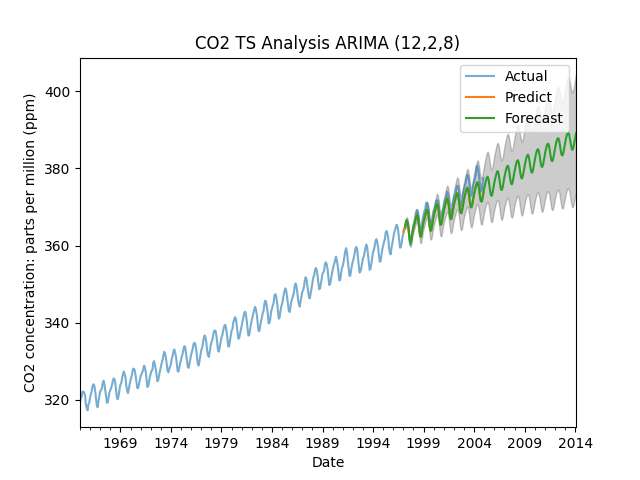
Fig 7 Carbon Dioxide Concentration Forecast with ARIMA
Final Notes: This article prioritizes clarity and understanding, aiming to empower readers with practical insights into time series analysis using ARIMA. As the field of data science evolves rapidly, with frequent updates to software packages, it's essential to remain adaptable. We anticipate making edits to code fragments as necessary to keep pace with advancements in the field.
- Details
- Written by: Acacos
- Category: blog
- Hits: 484
Logistics Regression is a simple and powerful model for machine learning classification algorithms. As simple as it is, logistics regression for classification could be tricky, and to find an acceptable model, someone might have to go run several iterations.
On the web sphere, we see various publications and tutorials showing 99% accuracy or 90% f1 score. While those results might be achievable readers must be extremely careful about the context, the data used, the application, etc... Without applying some professional techniques, the best accuracy is 72% and the highest optimized f1 score is 52%.
Note: Though tempting, Logistic Regression could NOT explain causality, it is mostly used as a predictive function.
There are 3 important points with Logistic Regression:
- Confusion Matrix (False Positive could be very dangerous)
- Class Imbalance
- Model Performance criteria or scoring
Logistic Regression is a linear model derived to solve classification problems. Logistic regression falls under supervised machine learning type modeling. This means we train a historical dataset to predict results. By definition, unsupervised do not need training.
What kind of problems does Logistics Regression Solve?
1 - Binary Logistics Regression
The target value has only two categories for example:
- (Yes / No)
- (1 / 0)
- (True / False)
- (Spam / Safe)
Some real-life applications would be Healthcare: Predict if a patient has a disease i.e. machine learning to predict diabetes is very famous. These types of binary output algorithms have been used by financial institutions to predict if a person would default on their loan payment, or if a credit card transaction is fraudulent. E-commerce uses the likelihood score above 70% to recommend upselling and cross-selling products, this has been a fantastic marketing tactic to boost sales.
2 - Multinomial Logistics Regression
The target has more than two categories that are not in a specific order for example:
- (Banana / Apple / Peach)
- (Lion / Panda / Bear)
A real-life application would be the famous IRIS classification. Recently the farming industry is upgrading many businesses with machine learning classifiers.
3 - Ordinal Logistics Regression
The target value has more than 2 categories with intrinsic grading values:
- (Excellent / Very Good / Good)
- (5 Stars / 4 Stars / 3 Stars)
A real-Life application would be a business review and rating
Model Evaluation for Logistic Regression
Although Logistic Regression is easy to use and fast at making predictions model evaluation is counterintuitive
1 - Accuracy
It is the most commonly used method to evaluate how well the model is predicting results. Many data scientists compare Accuracy to the Null Accuracy to rank model performance. In practice when looking at the confusion matrix, someone could quickly conclude that accuracy is not the preferred performance evaluation method.
2 - Classification Report
The classification report is the better method for comparing the performance of Logistics Regression models. Two models might have equal Accuracy but one model with higher precision and recall values is a far superior model.
The Dataset
There are many datasets to choose from. To keep it simple we selected the dataset provided by UCLA which could be downloaded from here. The dataset is simple and common, it shows the decision of admission versus not based on GRE and GPA. The rank is a college classification metric with rank 1 being the best down to 4. It is worth testing if the college ranking metric is influencing the output and in particular if we reverse the ranking from 4 to 1 where 1 would be the best college.
Problem Statement
Could we use logistic regression to predict the admission of a student based on GRE, GPA, and college rank?
Data Preparation for Logistic Regression
- Set and inspect the data (missing values, duplicates, outliers, features...)
- Define the features (independent variables)
- Decide if dummy variables are needed
- Set the dependent variable
- Raw data or scaled or standardized data?
- Split the data (80/20, 75/25, 70/30) for this example they all work
- Plot the data pairwise
- Check for colinearity
- Check for imbalance in the dependent variables (is the number of zero equal to the number of one)?
- Fine Tune the algorithm if necessary
Here is the Logistic Regression Python Code Complete, with all the comments it should be self-explanatory. And for the sake of clarity let's call the first run Benchmarking
Benchmarking Admission Logistics Regression
import pandas as pd
from sklearn.model_selection import train_test_split
from sklearn.linear_model import LogisticRegression

#import data
df = pd.read_csv("admission.csv")

X = df.iloc[:,df.columns != 'admit']
y = df['admit']

#Split data into test and train
X_train,X_test,y_train,y_test = train_test_split(X,y,test_size=0.25,random_state=0)

logistic_regression= LogisticRegression()
logistic_regression.fit(X_train,y_train)

y_pred=logistic_regression.predict(X_test)

from sklearn.metrics import  confusion_matrix, accuracy_score, classification_report
from matplotlib import pyplot as plt
import seaborn as sns

cfm=confusion_matrix(y_test,y_pred)
plt.title("Confusion Matrix")
sns.heatmap(cfm, annot=True, fmt='',cbar=False)
plt.show()

TP = cfm[1,1]
TN = cfm[0,0]
FP = cfm[1,0]
FN = cfm[0,1]

print ('True Positive: ', TP)
print ('True Negative: ', TN)
print ('False Positive: ', FP)
print ('False Negative: ', FN)

print('Confusion Matrix:  \n', cfm)
print('Accuracy: ', accuracy_score(y_test, y_pred)*100,'%')
print ('Manual Accuracy: ', ((TP+TN)/(TP+TN+FP+FN))*100,'%')
print('Class Report: \n', classification_report(y_test, y_pred))
Before we explain the result of the confusion matrix it is critical to say that there are different index conventions for the confusion matrix. The placement of the axis of the confusion matrix of Wikipedia is different from the scikit learn confusion matrix library we used here.
The result of the confusion matrix is:
- True Positive TP = 8
- True Negative TN = 64
- False Positive FP = 27
- False Negative FN = 4
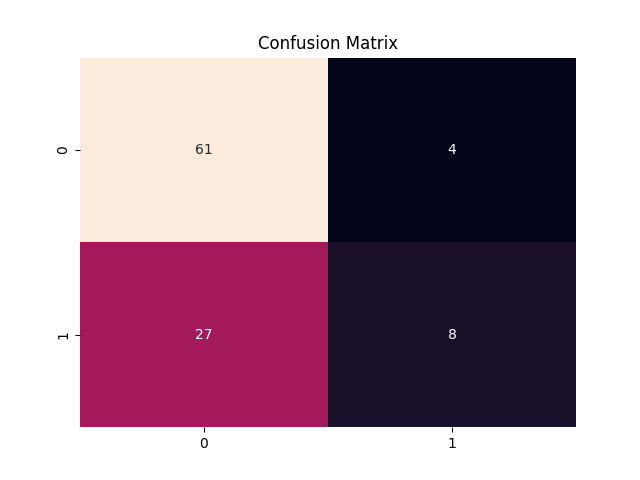
Logistic regression is a classification algorithm in this case the output class is binary either admit (1) or not admit (0). From the confusion matrix, the predicted admission versus the actual admission is calculated and then plotted. The confusion matrix provides a 2x2 matrix where index (1,1) is True Positive, (0,0) is True Negative, (1,0) is False Positive and (0,1) is False Negative. The accuracy of the model is simply calculated by the (TP+TN)/(TP+TN+FP+FN).
Extreme care must be taken when using Logistics Regression, for critical applications such as healthcare, the military, forensic work, etc... an impressive 98% accurate model could lead to the death of people we have seen cases where the confusion matrix False Positive and False Negative constitute a big chunk. A 1% of 10,000 people is about 100 people with the wrong prediction that is way too much.
Our benchmark model score is 69% which might be good for noncritical models such as junk mail filtering.
True Positive:  8
True Negative:  61
False Positive:  27
False Negative:  4
Confusion Matrix:
 [[61  4]
 [27  8]]
Accuracy:  69.0 %
Manual Accuracy:  69.0 %
Class Report:
               precision    recall  f1-score   support

           0       0.69      0.94      0.80        65
           1       0.67      0.23      0.34        35

    accuracy                           0.69       100
   macro avg       0.68      0.58      0.57       100
weighted avg       0.68      0.69      0.64       100
Class Imbalance
Care must be taken when implementing Logistic Regression, in some datasets with binary 0,1 responses, the output could be biased such that 98% of the target is either 0 or 1. In which case the score of the model is 98% which in theory is a perfect performance. In that case, the model is good but the physical problem is not properly defined and the dataset is known to have a high Class Imbalance.
In our admission dataset, the admission rate is 32% with label '1' and the rejection rate is 68% with label '0'. When building the model, the computation might induce a bias toward the majority class and the model might erroneously predict more '0' than expected.
How to handle Class Imbalance in Logistics Regression?
The first step is to recognize that there is a Class Imbalance, and for 68% vs 32% distribution there is a Class Imbalance. There are several approaches to account for Imbalance in a dataset. Proportionally, we could reduce the frequency of the majority class, or vice versa we might increase the frequency of the minority class. In this preprocessing step the aim is to obtain the same number of observations of both classes for model development purposes. The proportionality could be implemented using a weighting factor.
Depending on the software package being used, some logistic regression software supports the weighing factor natively. In our case the weighing class is built-in and we will use it for potentially better performance.
In our improved model, we will also use some Tuning Parameters known as hyperparameter tuning. While it seems a little cumbersome having to go back and forth this method has a lot of potentials.
In this section, we will run the code with a manual class weight that represents the inverse ratio of Class 1 and Class 0 i.e. 0.68 vs 0.32.
import pandas as pd
import numpy as np
from sklearn.model_selection import train_test_split
from sklearn.linear_model import LogisticRegression
from sklearn.metrics import  confusion_matrix, accuracy_score, classification_report

#import data
df = pd.read_csv("admission.csv")

X = df.iloc[:,df.columns != 'admit']
y = df['admit']

#Split data into test and train
X_train,X_test,y_train,y_test = train_test_split(X,y,test_size=0.25,random_state=42)

#Benchmarking starting the weight class with reversed proportions
LR_Model_Base =LogisticRegression(class_weight={0:0.32,1:0.68})
LR_Model_Base.fit(X_train,y_train)
y_pred=LR_Model_Base.predict(X_test)
cfm=confusion_matrix(y_test,y_pred)
print('Confusion Matrix:  \n', cfm)
print('Accuracy: ', accuracy_score(y_test, y_pred)*100,'%')
print('Class Report: \n', classification_report(y_test, y_pred))
Expecting the accuracy result to go up? Actually at 60% accuracy went down by 9% percentage points with respect to the first trial.
The only thing we changed with respect to the first run is class weight to account for the Class Imbalance in the data set
Confusion Matrix:
 [[39 27]
 [13 21]]
Accuracy:  60.0 %
Class Report:
               precision    recall  f1-score   support

           0       0.75      0.59      0.66        66
           1       0.44      0.62      0.51        34

    accuracy                           0.60       100
   macro avg       0.59      0.60      0.59       100
weighted avg       0.64      0.60      0.61       100
Is there a better way to estimate the class weight?
Is there a way to increment through class weight sets and find an optimal point?
Using Grid Search cross-validation the system will run through many parameter sets to suggest better argument sets for Logistics Regression.
import pandas as pd
import numpy as np
from sklearn.model_selection import train_test_split
from sklearn.linear_model import LogisticRegression
from sklearn.metrics import  confusion_matrix, accuracy_score, classification_report

#import data
df = pd.read_csv("admission.csv")

X = df.iloc[:,df.columns != 'admit']
y = df['admit']

#Split data into test and train
X_train,X_test,y_train,y_test = train_test_split(X,y,test_size=0.25,random_state=42)

LR_Model= LogisticRegression()
#0.99 converges better than 1, no more 100 for faster code
CIW = np.linspace(0.0,0.99,100)

param = dict()
param['solver'] = ['liblinear', 'saga', 'sag','lbfgs', 'newton-cg']
param['penalty'] = ['l1', 'l2', 'elasticnet','none']
param['C'] = [1e-5, 1e-4, 1e-3, 1e-2, 1e-1, 1, 10, 100]
param['class_weight'] = [{0:x,1:1.0-x} for x in CIW]

from sklearn.model_selection import StratifiedKFold
from sklearn.model_selection import GridSearchCV
# Cross Validation 5 folds
folds = StratifiedKFold(n_splits=5, shuffle=True, random_state=42)

#Gridsearch for hyperparam tuning
GS= GridSearchCV(LR_Model, param, n_jobs=-1, scoring='accuracy', cv=folds, return_train_score=True)
GS.fit(X_train,y_train)
print("Achievable score: ", GS.best_score_)
print("Estimator: ", GS.best_estimator_)
print("Hyperparameters: ", GS.best_params_)
Note Setting the Grid Search with many parameters as we did in the above example will take some time to converge, any time from a few minutes up to some hours - so be patient and methodically try to reduce the input parameters that are not needed.
As shown the output will provide the optimized Logistic Regression argument.
Achievable score:  0.7166666666666667
Estimator:  LogisticRegression(C=10, class_weight={0: 0.53, 1: 0.47})
Hyperparameters:  {'C': 10, 'class_weight': {0: 0.53, 1: 0.47}, 'penalty': 'l2'}
From the hyperparameters we got from the previous trial, we could now edit the argument and see if we get a better performance and accuracy result.
import pandas as pd
import numpy as np
from sklearn.model_selection import train_test_split
from sklearn.linear_model import LogisticRegression
from sklearn.metrics import  confusion_matrix, accuracy_score, classification_report

#import data
df = pd.read_csv("admission.csv")

X = df.iloc[:,df.columns != 'admit']
y = df['admit']

#Split data into test and train
X_train,X_test,y_train,y_test = train_test_split(X,y,test_size=0.25,random_state=42)

# With Hypertuning Paramaters
LR_Model= LogisticRegression(C=10,class_weight={0:0.53,1:0.47},penalty="l2")
LR_Model.fit(X_train,y_train)

y_pred=LR_Model.predict(X_test)

cfm=confusion_matrix(y_test,y_pred)

print('Confusion Matrix:  \n', cfm)
print('Accuracy: ', accuracy_score(y_test, y_pred)*100,'%')
print('Class Report: \n', classification_report(y_test, y_pred))
I warned unless done right tuning might take forever.
With 70% accuracy, the model now is better than the 60% we have prior and the best we have achieved so far in this article.
Another observation is that in the Confusion Matrix the numbers of true positive and false positive and true positive have changed dramatically.
Confusion Matrix:
 [[65  1]
 [29  5]]
Accuracy:  70.0 %
Class Report:
               precision    recall  f1-score   support

           0       0.69      0.98      0.81        66
           1       0.83      0.15      0.25        34

    accuracy                           0.70       100
   macro avg       0.76      0.57      0.53       100
weighted avg       0.74      0.70      0.62       100
We changed the hypertuning a bit to optimize for precision and recall as shown.
import pandas as pd
import numpy as np
from sklearn.model_selection import train_test_split
from sklearn.linear_model import LogisticRegression
from sklearn.metrics import  confusion_matrix, accuracy_score, classification_report

#import data
df = pd.read_csv("admission.csv")

X = df.iloc[:,df.columns != 'admit']
y = df['admit']

#Split data into test and train
X_train,X_test,y_train,y_test = train_test_split(X,y,test_size=0.25,random_state=42)

LR_Model= LogisticRegression()
#0.99 converges better than 1, no more 100 for faster code
CIW = np.linspace(0.0,0.99,100)

param = dict()
param['solver'] = ['liblinear', 'saga', 'sag','lbfgs', 'newton-cg']
param['penalty'] = ['l1', 'l2', 'elasticnet','none']
param['C'] = [1e-5, 1e-4, 1e-3, 1e-2, 1e-1, 1, 10, 100]
param['class_weight'] = [{0:x,1:1.0-x} for x in CIW]

from sklearn.model_selection import StratifiedKFold
from sklearn.model_selection import GridSearchCV
# Cross Validation 5 folds
folds = StratifiedKFold(n_splits=5, shuffle=True, random_state=42)

#Gridsearch for hyperparam tuning
GS= GridSearchCV(LR_Model, param, n_jobs=-1, scoring='f1', cv=folds, return_train_score=True)
GS.fit(X_train,y_train)
print("Achievable score: ", GS.best_score_)
print("Estimator: ", GS.best_estimator_)
print("Hyperparameters: ", GS.best_params_)
And the result would be
Confusion Matrix:
 [[28 38]
 [ 8 26]]
Accuracy:  54.0 %
Class Report:
               precision    recall  f1-score   support

           0       0.78      0.42      0.55        66
           1       0.41      0.76      0.53        34

    accuracy                           0.54       100
   macro avg       0.59      0.59      0.54       100
weighted avg       0.65      0.54      0.54       100
Now with this result, some can notice a significant increase in f1 score namely the precision and recall for class "1" category admitted. The precision and recall are much better than the benchmark run. It looks that no matter what we do the model is not good enough with 54% accuracy.
- Details
- Written by: Acacos
- Category: blog
- Hits: 416
Welcome to our comprehensive guide on mastering Multiple Linear Regression (MLR) for Artificial Intelligence (AI) using Python. If you're eager to unlock the power of data-driven decision-making and build cutting-edge AI models, you're in the right place!
In today's digital age, AI is transforming industries, revolutionizing processes, and reshaping the way we approach problem-solving. At the heart of many AI applications lies MLR, a fundamental statistical technique that enables us to analyze relationships between multiple independent variables and predict outcomes with remarkable accuracy.

Image by jcomp on Freepik
But before we dive into the intricacies of MLR and its applications in AI, let's take a step back and understand why mastering this technique is crucial for success in the ever-evolving landscape of artificial intelligence.
Why Master MLR for Artificial Intelligence?
MLR serves as the backbone of many Artificial Intelligence algorithms, providing a solid foundation for understanding complex datasets, identifying patterns, and making informed predictions. Whether you're a seasoned data scientist, an aspiring AI enthusiast, or a business leader looking to leverage AI for strategic decision-making, proficiency in MLR is indispensable.
By mastering MLR, you gain the ability to:
-
By mastering MLR, you gain the ability to:
-
Extract valuable insights from diverse datasets: MLR equips you with the tools to uncover hidden relationships between variables, enabling you to extract actionable insights and drive data-informed decisions.
-
Build predictive models with precision: With Multiple Linear Regression, you can develop sophisticated predictive models that accurately forecast future outcomes, anticipate trends, and optimize business processes.
-
Enhance Artificial Intelligence capabilities across industries: From owners-operated HVAC service to transportation businesses, MLR empowers organizations to harness the full potential of AI, revolutionizing industries and driving innovation at scale.
-
Optimize fleet management and customer behavior: Leveraging MLR insights, transportation businesses can analyze customer behavior, optimize routes, and enhance fleet management, leading to improved operational efficiency and customer satisfaction.
-
Engage subscribers with tailored content: For non-profit organizations, MLR enables the analysis of subscribers' interests and preferences, facilitating the creation of personalized content and events that resonate with their audience, driving engagement and loyalty.
-
Maximize college marketing efforts: In the realm of college marketing, MLR offers a strategic approach to understanding potential student reach, identifying target demographics, and optimizing marketing campaigns to attract prospective students effectively.
-
What to Expect in This Guide
In this comprehensive guide, we'll walk you through everything you need to know to master MLR for AI. From understanding the fundamentals of MLR and implementing Python code to handling multicollinearity issues and optimizing model performance, we've got you covered.
Each section is carefully crafted to provide practical insights, actionable strategies, and real-world examples, ensuring that you not only grasp the concepts but also gain the confidence to apply them in your AI projects.
So, whether you're embarking on your AI journey or looking to elevate your existing skills, join us as we unravel the mysteries of MLR and embark on a transformative journey towards AI mastery.
Ready to unlock the secrets of MLR and revolutionize your approach to artificial intelligence? Let's dive in!
The Power of Multiple Linear Regression (MLR) for Artificial Intelligence
Welcome to the gateway of AI mastery! In this section, we'll embark on an enlightening journey into the world of Multiple Linear Regression (MLR) and its profound implications for artificial intelligence. Get ready to demystify complex datasets, uncover hidden patterns, and unleash the predictive prowess of MLR like never before.
Understanding the Essence of MLR
At its core, MLR represents the cornerstone of data-driven decision-making, offering a systematic approach to understanding relationships between multiple variables and predicting outcomes with precision. Unlike its predecessor, Simple Linear Regression which One-to-One relation (also called BiVariate), Multiple Linear Regression (MLR) is One-to-Many (also called MultiVariate), allows us to navigate the intricate web of interconnected variables, making it a vital tool in the arsenal of Artificial Intelligence practitioners.
The Art of Data Preparation
Before diving headfirst into MLR, it's imperative to lay the groundwork with meticulous data preparation. From defining independent and dependent variables to conducting relevance checks and addressing missing values, each step in the data preparation process plays a pivotal role in shaping the success of our MLR endeavors.
- Define the Independent Variable IV (Y)
- Generate a list of potential Dependent Variables DVs (X)
- Prepare Dummy Variable (more about this later)
- Inspect the dataset for missing values (if necessary remove records with missing data)
- Ideally, run a relevance check, the relationship between each IV and DVs using scatter plots or correlations
- Check the relationships between the independent variables (Colinearity check or Multicollinearity - critical)
- Remove Redundant DVs
- Find and Remove Outliers
- If Necessary Segment your Multiple Linear Regression into Sub_MLRs
Navigating the Dataset: A Practical Example
Let's embark on a practical journey into the heart of MLR by exploring a rich housing dataset, brimming with insights just waiting to be unearthed. Our dataset, sourced from OpenML.org, offers a treasure trove of information, with 81 columns and 1460 rows waiting to reveal their secrets.
In our quest to predict the sale value of residential properties with unparalleled accuracy, we'll scrutinize a myriad of factors, ranging from square footage and bedroom counts to bathroom amenities and beyond. However, to ensure our analysis remains focused and relevant, we've narrowed our scope to properties with a "Normal Sale" condition, excluding outliers and irrelevant data points that may skew our results.
As we delve deeper into the dataset, we encounter a diverse array of variables, including both numerical values and categorical variables. To effectively handle this heterogeneity, we'll leverage the power of dummy variables, a potent technique for encoding categorical data into a format suitable for MLR analysis.
But our journey doesn't end here. With the dataset in hand, we'll embark on a voyage of exploration and discovery, breaking the data into training and testing sets to facilitate model development and validation. Through meticulous preparation and strategic analysis, we'll unlock the latent potential of our dataset, paving the way for groundbreaking insights and transformative AI applications.
So, strap in and prepare for an exhilarating journey into the heart of data-driven decision-making. The road ahead may be challenging, but with perseverance and ingenuity, we'll unravel the mysteries of MLR and unlock the keys to AI innovation. Welcome aboard, fellow adventurer—the adventure begins soon.
Scaling the MLR Summit
As we ascend the MLR summit, scalability emerges as a guiding principle in our quest for AI mastery. By embracing an iterative approach to model building and optimization, we equip ourselves with the agility to tackle real-life challenges and forge ahead on the path to AI enlightenment.
Your Multiple Linear Regression Journey Begins Here
With the groundwork laid and your tools at the ready, it's time to embark on your MLR odyssey. Armed with insights and strategies from our previous discussions, you're now well-equipped to navigate the intricate world of Multiple Linear Regression (MLR) and unlock its transformative potential for artificial intelligence.
Stay tuned as we delve deeper into the nuances of MLR, unraveling its mysteries and unlocking the gates to AI innovation. The future of AI awaits, and your journey begins now.
Code and Analysis:
import pandas
import numpy
from sklearn import linear_model

df = pandas.read_csv("housing_openml_v1.csv")

X = df[['GrLivArea', 'BedroomAbvGr','FullBath']]
y = df['SalePrice']

X = X.iloc[:,:].values # Independent variable (X)
y = y.iloc[:].values   # Dependent variable (Y)

regr = linear_model.LinearRegression()
regr.fit(X, y)

sale_Price =154000 # Actual price $154,000
predicted_Price = regr.predict([[1060, 3, 1]])

numpy.set_printoptions(precision=0)
Err = predicted_Price - sale_Price
print('Predicted Price: $', predicted_Price, "Error: $", Err, "    Error Percent:  %", 100*Err/sale_Price)

CoeffDet = regr.score(X,y)*100
print('Coeff Det R^2: {:.1f}'.format(CoeffDet),'%')
Assessing Predictive Accuracy
The results are in, and they reveal a predicted sale price of $111,917, a considerable deviation from the actual price of $154,000. This discrepancy translates to an underprediction of $42,083, representing a significant -27% error. At first glance, such a high error rate may raise questions and concerns about the reliability of our model.
However, it's essential to contextualize these findings within the broader framework of MLR analysis. While the -27% error pertains to a single data point, it may not accurately reflect the overall performance of our algorithm. To gain a more comprehensive understanding, we turn to the Coefficient of Determination, or R-squared, a powerful metric that evaluates the model's ability to explain the variability in the dataset.
Unveiling the Coefficient of Determination
At 62.7%, the Coefficient of Determination paints a more nuanced picture of our model's performance. This metric indicates that approximately two-thirds of the variation in housing prices can be attributed to the variables we've selected for our MLR analysis. While not perfect, this level of explanatory power suggests that our model captures a significant portion of the underlying patterns in the data.
This visualizes the journey into MLR, providing insights into both the challenges and the potential of this powerful technique for AI innovation.
Predicted Price:     $111,917     |     Error:     -$42,083     |     Error Percent:      -27%
Coeff Det R^2:      62.7 %
Navigating Challenges: Managing Data Complexity
As we delve deeper into our analysis, questions arise:
- Did the buyer overpay?
- Is the algorithm flawed?
- Can we optimize its performance?
Evaluating the effectiveness of the algorithm demands scrutiny, yet with 81 rows in our dataset, tackling multicollinearity tests and scatter matrix visualizations presents a formidable task.
Strategic Data Inspection
In confronting this data deluge, strategic data inspection emerges as our beacon of clarity. Leveraging Python's versatile tools, we employ cool functions like 'describe' to swiftly glean insights into critical dataset characteristics. This approach streamlines our analysis, enabling us to prioritize key data facets while maximizing efficiency.
Harnessing the Power of 'describe'
By harnessing the 'describe' function, we gain a panoramic view of our dataset's statistical landscape, from mean values to quartile ranges. This holistic perspective empowers us to detect anomalies and inconsistencies, informing decisions on data preprocessing and model refinement.
#typicall it is df.describe(include='all')
#since the dataset is to big we use the print() or we out the result to a separate file
print(df.describe(include='all'))
temp = df.describe( include='all')
temp.to_csv('describe_output.csv')
Unveiling Insights from the 'describe' function output
Upon scrutinizing the 'describe_output.csv', a revealing discrepancy emerges: the standard deviation for 'GrLivArea' exceeds expectations, suggesting potential outliers or data irregularities. Swiftly pivoting to 'LotArea' as a more reliable predictor yields improved results, enhancing the robustness of our MLR model.
| Statistics | LotArea | GrLivArea |
|---|---|---|
| unique | ||
| top | ||
| freq | ||
| mean | 10543.48 | 1492.968 |
| min | 1300 | 334 |
| max | 215245 | 4316 |
| std | 10681.02 | 496.7496 |
| 25% | 7544.5 | 1110.25 |
| 50% | 9468.5 | 1456 |
| 75% | 11451.5 | 1766.25 |
Key Takeaways: Insights and Learnings
Our journey through data exploration underscores the pivotal role of tools like 'describe' in uncovering hidden insights and anomalies. By detecting outliers early in the process, we refine our feature selection and bolster the accuracy of our MLR model.
In essence, the 'describe' function serves as our compass, guiding us towards data-driven decision-making and empowering us to extract meaningful insights. As we continue our voyage through MLR and AI, let us carry forward the lessons learned from our 'describe' journey—lessons that will shape our data analysis and model development endeavors for years to come.

Visualizing Data Relationships: Unveiling Insights through Scatter Matrix
As we advance in our exploration of MLR, visualizing the intricate relationships between variables emerges as a crucial step in unraveling hidden patterns within our dataset. Among the arsenal of analytical tools at our disposal, the scatter matrix stands out, offering a panoramic view of pairwise correlations that can significantly enhance our model development process.
Harnessing the Power of Data Visualization
Before immersing ourselves in the scatter matrix, it's imperative to ensure our dataset undergoes meticulous refinement to optimize it for analysis. Leveraging the 'describe' function, we gain invaluable statistical insights into key dataset features, empowering us to pinpoint outliers and inconsistencies that might impede the accuracy of our MLR model.
import pandas as pd
import numpy
from sklearn import linear_model

df = pandas.read_csv("housing_openml_v1.csv")

pd.options.display.float_format = '{:,.1f}'.format
print(df.describe(include='all'))
temp = df.describe( include='all')
temp.to_csv('out.csv')

X = df[['LotArea', 'BedroomAbvGr','FullBath']]
y = df['SalePrice']

X = X.iloc[:,:].values # Independent variable (X)
y = y.iloc[:].values   # Dependent variable (Y)

regr = linear_model.LinearRegression()
regr.fit(X, y)

sale_price =154000 #$154,000
predicted_Price = regr.predict([[8246, 3, 1]])

numpy.set_printoptions(precision=0)
print('Predicted Price: $', predicted_Price)

Err = predicted_Price - sale_price
print("Error: $", Err, "    Error Percent:  %", 100*Err/sale_price)
Interpreting Prediction Results
Upon scrutinizing the prediction outcomes, we initially observe an apparent enhancement in accuracy, evidenced by a -13% error rate. However, a deeper analysis unveils a substantial decline in the Coefficient of Determination, plummeting from 62.7% to 36.9%. This variance suggests that while our model excels in predicting individual data points, its efficacy diminishes when applied holistically to the entire dataset. Notably, the discrepancy appears to be driven by the disparity between LotArea and GrLivArea, indicating that GrLivArea serves as a superior predictor for the dataset as a whole.
We intentionally spotlighted this unit to underscore the distinction between analyzing individual units versus the dataset as a whole. It's crucial to bear in mind that our ultimate goal is to develop a model that accurately encapsulates the broader dataset dynamics.
Predicted Price:     $133,709     |     Error:     -$20,291     |     Error Percent:      -13%
Coeff Det R^2:      36.9 %
Assessing Model Robustness: Impact of Independent Variables
In our journey through Multiple Linear Regression (MLR), we encounter pivotal crossroads where the selection of independent variables wields immense influence over the predictive prowess of our model. Let's embark on a journey to unravel how the inclusion or exclusion of specific variables can sculpt the performance landscape of our model.
Analyzing Variable Impact
Initially, our MLR model incorporated Square footage, bedroom count, and Full Bath amenities as independent variables. To gauge the significance of each variable,
At the genesis of our MLR odyssey, our model embraced "Square footage", "bedroom count", and "Full Bath" amenities as its independent variables. To gauge the significance of each variable, we systematically assess their impact on prediction accuracy.
Let's check what happens when we remove one independent variable, the column labeled "Full Bath"!
import pandas as pd
import numpy
from sklearn import linear_model

df = pandas.read_csv("housing_openml_v1.csv")

X = df[['LotArea', 'BedroomAbvGr']]
y = df['SalePrice']

X = X.iloc[:,:].values # Independent variable (X)
y = y.iloc[:].values   # Dependent variable (Y)

regr = linear_model.LinearRegression()
regr.fit(X, y)

sale_price =154000 #$154,000
predicted_Price = regr.predict([[8246, 3]])
numpy.set_printoptions(precision=0)
Err = predicted_Price - sale_price
print('Predicted Price: $', predicted_Price, "Error: $", Err, "    Error Percent:  %", 100*Err/sale_price)
CoeffDet = regr.score(X,y)*100
print('Coeff Det R^2: {:.1f}'.format(CoeffDet),'%')
Result
Predicted Price:     $173,177     |     Error:     -$19,177     |     Error Percent:      -12%
Coeff Det R^2:      12.0 %
Evaluating Model Performance
Upon meticulous analysis, we observe a noteworthy decrease in the Coefficient of Determination plummeting from 62.7% to 12%, indicating a substantial decline in predictive accuracy when excluding the 'Full Bath' variable. While assessing individual data points may yield insights, it's imperative to evaluate the model's overall performance across the dataset.
Refining Multiple Linear Regression Model Evaluation for Artificial Intelligence
In our quest for mastery over Multiple Linear Regression (MLR) models, a crucial step lies in refining our evaluation techniques to glean deeper insights into their performance within the realm of Artificial Intelligence. Let's embark on a journey of refinement, where we enhance our model evaluation process to unlock its full potential.
Comprehensive Model Evaluation
To embark on a comprehensive evaluation of our MLR model, we pivot our strategy to incorporate both training and testing datasets. By partitioning the data into a 70% allocation for training and 30% for testing, we gain a panoramic view of our model's predictive prowess. This strategic maneuver not only showcases the performance of our code but also provides a robust assessment of its predictive capabilities across diverse datasets. We start the code with only 2 independent variables but we will add more independent variables as we progress through.
import pandas as pd
import numpy as np
from sklearn import linear_model

df = pandas.read_csv("housing_openml_v1.csv")

X = df[['LotArea', 'BedroomAbvGr']]
y = df['SalePrice']

X = X.iloc[:,:].values # Independent variable (X)
y = y.iloc[:].values   # Dependent variable (Y)

#Split the data with 70% for training and 30% for testing
from sklearn.model_selection import train_test_split
X_train, X_test, y_train, y_test = train_test_split(X, y, test_size = 0.3, random_state = 100)

regr = linear_model.LinearRegression()
regr.fit(X, y)

y_pred_Price = regr.predict(X_test)

#Model Evaluation
from sklearn import metrics
MeanAbEr = metrics.mean_absolute_error(y_test, y_pred_Price)
RMSqEr = np.sqrt(metrics.mean_squared_error(y_test, y_pred_Price))
MeanSqEr = metrics.mean_squared_error(y_test, y_pred_Price)
Scor = regr.score(X,y)*100

print('Mean Absolute Error: {:,.0f}'.format(MeanAbEr))
print('Mean Square Error: {:,.0f}'.format(MeanSqEr))
print('Root Mean Square Error: {:,.0f}' .format(RMSqEr))
print('Coeff Det R^2: {:.1f}'.format(Scor),'%')
Interpreting Evaluation Results
Upon analyzing the evaluation results, we observe that while the coefficient of determination remains unchanged, our model delivers a Mean Absolute Error of $47,664, a Mean Square Error of $4,185,186,139, and a Root Mean Square Error of $64,693. These metrics offer valuable insights into the accuracy and precision of our model, providing a robust foundation for further refinement and optimization. All we did is we re-wrote the code for a better understanding of the dataset.
Mean Absolute Error: 47,664
Mean Square Error: 4,185,186,139
Root Mean Square Error: 64,693
Coeff Det R^2: 12.05 %
Of critical importance before developing a Multilinear regression model, as stated in the data preparation list, is to check for multicollinearity. While analysts could go about making a pairwise multicollinearity analysis, also known as a correlation matrix, a technique known as Variation Inflation Factor VIF, is what we use.
Mitigating Multicollinearity
A pivotal consideration before delving into the development of a Multilinear Regression model is the detection and mitigation of multicollinearity. While conventional approaches may involve pairwise multicollinearity analyses, we employ a sophisticated technique known as Variation Inflation Factor (VIF) to unveil hidden correlations among independent variables. Variance inflation factor measures how much the behavior (variance) of an independent variable is influenced, or inflated, by its interaction/correlation with the other independent variables. This strategic approach ensures the integrity and reliability of our MLR model, paving the way for enhanced predictive capabilities and informed decision-making in the realm of Artificial Intelligence.
Detecting Multicollinearity: Variance Inflation Factor using Python
In our relentless pursuit of perfecting the Multiple Linear Regression (MLR) model, we plunge into the depths of data intricacies, focusing our attention on unraveling the mysteries of multicollinearity through the powerful tool of Variance Inflation Factor (VIF) analysis. By scrutinizing the interplay among independent variables, we strive to unearth potential correlations that could sway the accuracy of our model within the realm of Artificial Intelligence.
Conducting VIF Analysis
To commence our voyage into VIF analysis, we meticulously assemble a comprehensive array of independent variables from our dataset, ranging from structural dimensions to temporal attributes. Leveraging the robust capabilities of Python and the sophisticated functionalities of the Statsmodels library, we embark on our journey of discovery.
import pandas as pd
import numpy as np

df = pd.read_csv("housing_openml_v1.csv")

'''
All the indpendent variables for VIF analysis

X = df[['MSSubClass', 'LotArea', 'YearBuilt', 'YearRemodAdd',  'BsmtFinSF1', 'BsmtFinSF2', 'BsmtUnfSF',
        'TotalBsmtSF', '1stFlrSF', '2ndFlrSF', 'LowQualFinSF', 'GrLivArea', 'BsmtFullBath', 'BsmtHalfBath', 'FullBath',
        'HalfBath', 'BedroomAbvGr', 'KitchenAbvGr', 'TotRmsAbvGrd',  'Fireplaces', 'GarageCars', 'GarageArea', 'WoodDeckSF',
        'OpenPorchSF', 'EnclosedPorch', '3SsnPorch', 'ScreenPorch', 'PoolArea', 'MiscVal','MoSold', 'YrSold']]

Note: we removed 'TotalBsmtSF'  'LowQualFinSF' as they induced error in the code
'''

X = df[['MSSubClass','LotArea','YearBuilt','YearRemodAdd','BsmtUnfSF','BsmtFinSF1','BsmtFinSF2','1stFlrSF',
         '2ndFlrSF','GarageCars','GrLivArea','BsmtFullBath','BsmtHalfBath','FullBath','HalfBath','BedroomAbvGr',
         'KitchenAbvGr','TotRmsAbvGrd','Fireplaces','GarageArea','WoodDeckSF','OpenPorchSF','EnclosedPorch',
         '3SsnPorch','ScreenPorch','PoolArea','MiscVal','MoSold','YrSold']]

import statsmodels.api as sm
X = sm.add_constant(X) # You will have a headache if you do not add this line

from statsmodels.stats.outliers_influence import variance_inflation_factor
vif_df = pd.DataFrame()

vif_df["feature"] = X.columns
vif_df["VIF"] = [variance_inflation_factor(X.values, i) for i in range(len(X.columns))]

print(vif_df.round(1))
Interpreting Variance Inflation Factor (VIF) Analysis & Results:
Upon the culmination of our VIF analysis, a treasure trove of insights emerges, shedding light on the intricate correlations among independent variables:
          feature        VIF
0           const  2453429.5
1      MSSubClass        1.5
2         LotArea        1.2
3       YearBuilt        2.8
4    YearRemodAdd        1.7
5       BsmtUnfSF        3.5
6      BsmtFinSF1        4.5
7      BsmtFinSF2        1.5
8        1stFlrSF       65.7
9        2ndFlrSF       93.4
10     GarageCars        5.2
11      GrLivArea      124.0
12   BsmtFullBath        2.2
13   BsmtHalfBath        1.2
14       FullBath        2.9
15       HalfBath        2.2
16   BedroomAbvGr        2.3
17   KitchenAbvGr        1.5
18   TotRmsAbvGrd        4.9
19     Fireplaces        1.5
20     GarageArea        4.8
21     WoodDeckSF        1.2
22    OpenPorchSF        1.2
23  EnclosedPorch        1.2
24      3SsnPorch        1.0
25    ScreenPorch        1.1
26       PoolArea        1.0
27        MiscVal        1.0
28         MoSold        1.0
29         YrSold        1.1
Interpreting VIF Results:
- The VIF results illuminate the degree of multicollinearity prevalent among our independent variables.
- Variables exhibiting VIF values exceeding the threshold of 5 denote substantial correlation with other variables, necessitating meticulous scrutiny.
- To enhance the robustness of our model, we adhere to the prescribed cutoffs, electing to eliminate variables surpassing the VIF threshold of 5, namely: "1stFlrSF", "2ndFlrSF", "GrLivArea", and "GarageCars".
Key Takeaways:
- VIF analysis unveils hidden correlations, offering invaluable insights into the intricacies of our dataset.
- Rigorous assessment and strategic variable selection are imperative to fortify the predictive capabilities of our MLR model within the domain of Artificial Intelligence.
Refining Multiple Linear Regression the Better Method
In the relentless pursuit of perfection within the realm of Multiple Linear Regression (MLR), we embark on a journey of continuous refinement, aiming to elevate our predictive model to unparalleled heights of accuracy and reliability. Through a systematic approach and the integration of advanced methodologies like Variance Inflation Factor (VIF), we unravel the latent potential embedded within our dataset, ensuring that every adjustment propels us closer to predictive excellence.
X = df[['MSSubClass', 'LotArea', 'YearBuilt', 'YearRemodAdd', 'BsmtFinSF1', 'BsmtFinSF2', 'BsmtUnfSF',
        'TotalBsmtSF', 'LowQualFinSF', 'GrLivArea', 'BsmtFullBath', 'BsmtHalfBath', 'FullBath','HalfBath',
        'BedroomAbvGr', 'KitchenAbvGr', 'TotRmsAbvGrd', 'Fireplaces', 'GarageArea', 'WoodDeckSF',
        'OpenPorchSF', 'EnclosedPorch', '3SsnPorch', 'ScreenPorch', 'PoolArea', 'MiscVal','MoSold', 'YrSold']]
Enhanced Model Performance
With a refined arsenal of independent variables meticulously curated through rigorous analysis, our Multiple Linear Regression MLR model emerges as a beacon of predictive prowess. Following the judicious removal of redundant variables identified through VIF analysis, our model undergoes a transformative evolution, as evidenced by the surge in the coefficient of determination (R-squared) from a modest 12.05% to a commanding 84.4%. Moreover, significant reductions in Mean Absolute Error (MAE), Mean Square Error (MSE), and Root Mean Square Error (RMSE) underscore the enhanced precision and reliability of our predictions. This monumental leap signifies that a substantial portion of variability in sale prices is accurately encapsulated by our model, heralding a new era of predictive precision.
Mean Absolute Error: 19,895
Mean Square Error: 748,060,970
Root Mean Square Error: 27,351
Coeff Det R^2: 84.4 %
In our unwavering quest for precision, we stand poised to introduce the concept of dummy variables and embark on yet another iteration of VIF analysis. By embracing an iterative approach to model refinement, we push the boundaries of predictive accuracy, unraveling deeper insights into the intricate dynamics governing residential property sales. Stay tuned for the forthcoming chapter of our MLR odyssey, where every adjustment brings us closer to unlocking the full potential of our predictive model.