
We will talk about small business owners in particular food shops and local restaurants. It strikes me that all these big thinkers do not have a consolidated order processing and accounting system, worse they still use pen and paper to process their orders. Here is my argument, every big company, McDonald, Panera, Starbucks, has a consolidated order processing and accounting system.
While searching for some food near me we found a pizzeria shop called Anthony's Pizza has been using Excel and Aldelo POS database to produce a full-blown weekly report, including, sales (from different food online portals such as UBER Eat, Grubhub, Delivery.com), drivers tips, employees hrs in about 10 minutes.
Data Automation with Excel
According to one of the owners, when they first started, generating weekly reports required over 12 hrs. Just do the math from 12 hrs/ week to just 10 minutes /week, for the sake of simplicity let's round off the saving to 11hrs/ week.
So 11hrs/ weeks x 52 weeks /year that's 572hrs /year.
If your business pays a dedicated person a minimum wage to compile these reports, that $572x$15/hr = $8550 annually - savings. If a bookkeeper with a rate of $20/hr performs the task the loss is apprximately $11,440pay.
What is the Best POS system?
While there is not such a thing as Best POS. Restaurant owners need to be in full control of their business and the first remote controllers are your POS and your accounting system.
We do not own, promote, or are involved with any POS company! This is not a disclaimer, this is a fact and here we are sharing our experience and what we learned. Here are our few tips if you decide to own a POS:
- Get a POS with a database that you could read and maybe edit
- Get a POS that is easy to use also easy to train crew members
- Get a POS that is fast and does not crash frequently
- Get a POS that is installed locally on the device and could run as a standalone without internet access. Should there be a requirement for the internet it should be only to sync with an external master database.
- Strongly recommended integrating the POS with an online ordering platform
There is an awesome article on how to install Unicenta on Linux / Ubuntu platform by Chubby and it works.
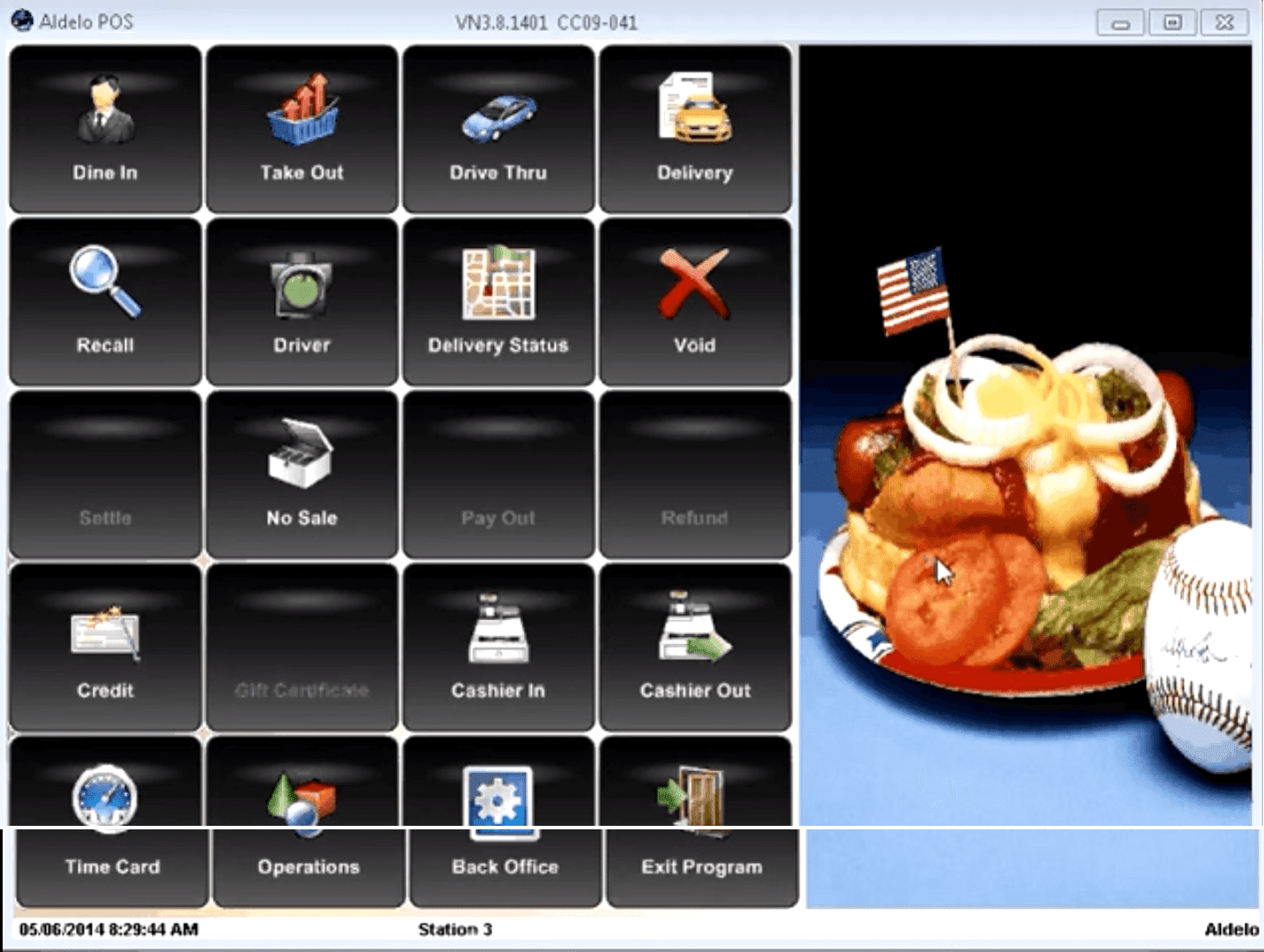
Aldelo pros
- It's locally installed and fast
- Orders on the screen are broken into Dine-In, Delivery, Take-out, and one more flexible config
- Well done access level - a cashier or junior level employee are limited to whatever the manager allows them to do.
- Native Loyalty Reward - but hold on
- Native Gift Certificate Program
- It easily handles bar codes
- It allows tables map
Aldelo cons - Yack! Really? The 2017 software release is the basis of our comments
- The worst thing about Aldelo, the user manual is so limited and not clear. Written for Aldelo representatives only - unless you attend a paid-for training and get certified, it is money down the drain.No online forum whatsoever!
- Support is "free" for 30 days only. Hold on. Once activated the support is available only for 30 days after that - they will milk you.
- It is still using an antique Microsoft Access Database with known corruption issues
- The loyalty Reward Program is a manual process. Need to ask the customer for their phone number every time to accumulate reward.
- The 2017 release screen resolution is limited to one size ONLY early 2000 era. It is NOT responsive.
- Two cities cannot share the same zip code.
- Who uses MapPoint in 2019? Pizzeria and restaurants live off local food delivery and MapPoint is so outdated and costs $300 for a license. Money that just went down the drain.
- Have you tried to configure a combo with Aldelo? A soup, a salad, and soda? Good luck! Luckily we were able to hear about tag-along items. And it simply does not work. And to get it up and running, you get charged.
- Calculation Errors
Aldelo Hacks | Excel Tips
Cross-network backup synchronization. Even better someone could use a powerful yet simple tool from samba utility this tool is called rsync and is very powerful to perform backups.
- Get time-resolved sales - Segmented
- Get menu item sales - Segmented if the software was set up correctly.
- Get customer sales and loyalty
- Get inventory reports
- Someone could develop a true Customer Life Value CLV. Aldelo has the elements to calculate CLV, but not enough to create an information-based decision. CLV is simply a priceless marketing metric - it is at the heart of a given business model. More about Customer Life Value.
- Someone could find the most profitable streets or delivery locations. With that, weaknesses could be identified and informed decisions could be made.
- How many consultants told you about menu engineering? Have you used Aldelo default menu engineering to realize how elementary it is? Does it provide value or help you make decisions? Do you have control over it?
Aldelo Menu Items Category
- Coffee
- Soft Drinks
- Wine
- Beer
- Pizza
- Entree
- Appetizers
- Salads
- Deserts
- Etc...
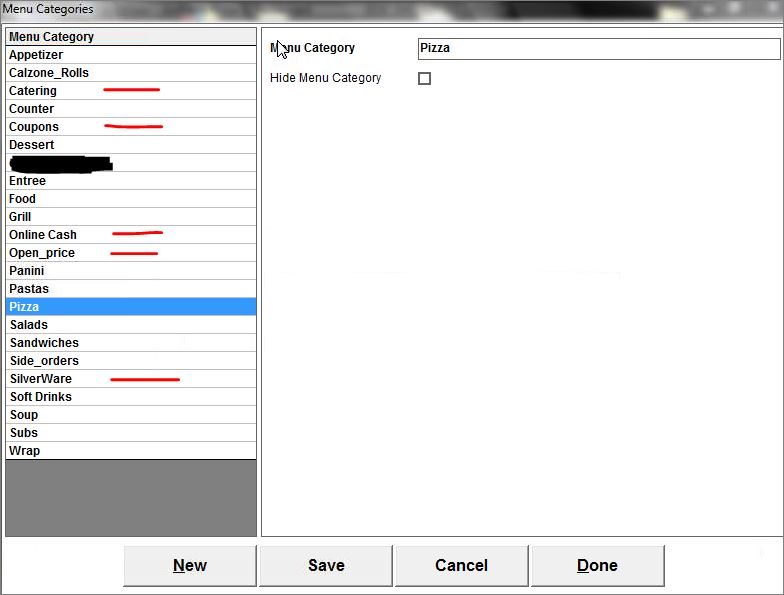
- Catering: This is used to segregate catering orders from large orders. Corporate Catering services is a recurring and profitable business, and owners could easily spot managers' effectiveness and their seriousness in getting catering business. Large orders, on the other hand, are random.
- SilverWare: This is equivalent to Utensils and used as a placeholder for $0 virtual menu items for delivery orders. Many hotel customers, order food from nearby pizzerias and request Plates, Forks, and knives. Guess what, the counter person who took the order forgot to write it down and the customer is upset and the driver did not get enough tips. So we added all possible utensils as menu items and dedicated a separate category. It helps when crew KIP are based on sales by dollar and menu items. In Hoboken NJ, the town started charging $0.10 for food take-out bags. Restaurants near Hoboken do not have to suffer through that non-sense additional tax.
- Coupons: We have to admit after trying to configure the discounts section of the Aldelo POS we failed miserably. Other than the basic percentage order or item discount or fixed dollar amount we could not do much. Documentation was not helpful so we decided to create our menu items and reverse engineer solutions that worked for us. Our combos, specials, and coupons all go to this Bin.
- Online_Cash: This is quite slick. Many restaurants get online cash orders. These cash orders unless entered into the system as cash transactions with an appropriate ticket #, payment for that order, either end up in someone's pocket or the cash register induces an over error. At the end of the night, the Manager could check all online orders and match them against this specific category.
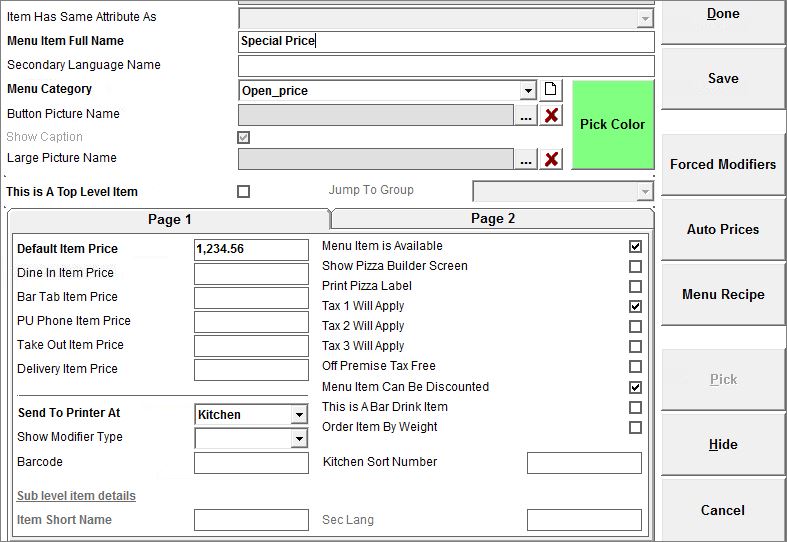
- Open_Price: This is equivalent to variable prices such as daily specials etc. In the Default Item Price just put 1,234.56. It is a catch-all for variable price items that are not in the printed menu. Here is the trick to having a variable price menu item on Aldelo. Noticed we categorized the variable price items under Open_price this helps trace errors, catch thieves and find items in demands that are not in the menu.
Excel For Aldelo
- Run Excel Pivot Tables (Power Pivot is a plus and could be used, Power Queries for Excel has some advantages and could handle very large datasets but as of 2019 standard Excel Pivot are easier and less buggy)
- Run Excel Queries (Power Queries is also an option but the files might be too large and take 1 minute to process and sometimes crush)